UHBVNL stands for Uttar Haryana Bijli Vitran Nigam Limited. It is the electricity distribution utility serving Northern Haryana. Its official online services allow consumers to handle routine billing and account work without visiting an electricity office for every request.
UHBVN provides public e-payment services such as Quick Pay, View Bill, Payment History, advance payment and KYC update. It also runs consumer complaint services with mobile/OTP access. The username/password login visible on parts of the e-payment site is primarily for authorised or government/multiple-bill users, so ordinary consumers can pay without using it.
This article explains UHBVNL login, online electricity bill payment, how to view or download a bill, customer care details and practical online services consumers may need.
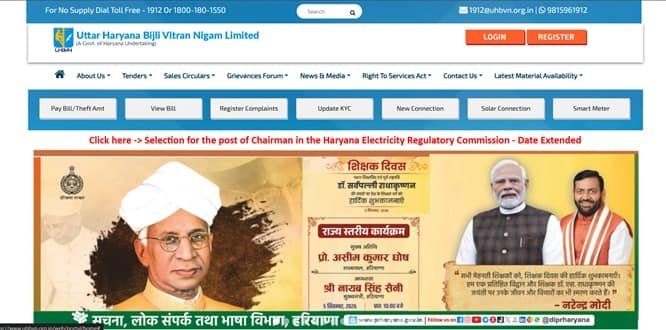
UHBVNL Quick Details
| Details | Information |
| Full Name | Uttar Haryana Bijli Vitran Nigam Limited |
| Common Name | UHBVNL |
| Service Area | Northern Haryana |
| Main Services | Electricity distribution and consumer services |
| Online Bill Payment | Available |
| Bill Viewing | Available |
| Primary Consumer Identifier | Account Number |
| Customer Care | 1912 / 1800-180-1550 |
| Office | Vidyut Sadan, Plot No. C-16, Sector 6, Panchkula, Haryana – 134109 |
| Official Website | uhbvn.org.in |
The official consumer system currently uses UHBVN consumer and e-payment portals. Consumers should enter the identifier exactly as printed on a recent bill and verify the connection details before authorising a payment.
UHBVNL Login
UHBVN provides consumer account and complaint services separately from the official-use login on the e-payment system. Ordinary consumers can use public payment functions without signing into the official-use page.
To access UHBVNL online consumer services, follow these general steps:
- Visit the official UHBVN website.
- Open the consumer My Account/consumer-service area where applicable.
- Use the registered consumer credentials or mobile/OTP option provided by the service.
- For complaint services, enter the registered mobile number and verify the OTP.
- Create a consumer account if the service asks for registration.
- Use the account dashboard for supported bill, complaint and service-request functions.
- Do not use the official-use or government-department login unless it applies to you.
If login fails, verify the consumer identifier and registered mobile/contact details before repeatedly resetting credentials. A recently changed mobile number or unmapped connection is a common reason for OTP or account-access problems.
UHBVNL Electricity Bill Payment
UHBVNL consumers can pay electricity dues through the authorised online payment route. In most cases, a one-time or quick-payment option is available so a consumer does not need to open the full registered dashboard merely to clear the current bill.
Before payment, keep the Account Number and a recent bill ready. Always confirm the consumer name, service address and amount shown on screen before proceeding to the payment gateway.
How to Pay UHBVNL Electricity Bill Online
The general process is:
- Open the official UHBVN e-payment portal.
- Select Quick Pay.
- Enter the Account Number.
- Enter the requested mobile number/email and CAPTCHA.
- Fetch the account and verify the consumer name and amount payable.
- Select an available payment mode such as card, net banking or electronic fund transfer.
- Complete payment and retain the e-receipt/reference.
After payment, do not close the page until the transaction status is displayed. Save the acknowledgement, transaction ID or receipt. This is especially important when payment is made close to the due date or when the account has previous arrears.
If the bank account is debited but the utility does not immediately show the payment, avoid making a duplicate payment without first checking payment status/history and the transaction reference.
How to View UHBVNL Electricity Bill
UHBVNL provides online bill access through its consumer or bill-viewing system. Depending on the utility, the current bill may be fetched directly with the Account Number, while historical bills generally require a registered account.
Steps to View UHBVNL Bill
- Open the UHBVN e-payment portal.
- Choose View Bill / View Bill History.
- Enter the Account Number.
- Complete CAPTCHA verification.
- Submit to fetch the bill or bill-history information.
- Check the billing period, amount and consumer details.
- Use Payment History when verifying an earlier online payment.
When checking a bill, review more than the total payable amount. Confirm the billing period, meter reading, units consumed, previous balance or adjustment, due date and any delayed-payment charge shown on the account.
How to Download UHBVNL Bill
Where the portal provides a bill PDF, statement or printable bill view, open the required billing period and use the download/print option. Consumers who need an older document should use bill history or statement-of-account services rather than relying only on the current Quick Pay screen.
It is useful to save important bills and payment receipts for address proof, reimbursement, tax/accounting records, tenant-landlord reconciliation or future billing disputes. A saved copy also helps when a portal is temporarily unavailable.
UHBVNL Customer Care Number
The principal UHBVNL consumer-support contact is 1912 / 1800-180-1550. Consumers should use official customer-care channels for supply failure, billing errors, meter issues, payment problems and other electricity-service complaints.
| Customer Service | Contact |
| UHBVNL Customer Care | 1912 / 1800-180-1550 |
| Official Website | uhbvn.org.in |
When registering a complaint, keep the consumer identifier, registered mobile number, exact service address and a short description of the problem ready. Note the complaint/reference number and use it for follow-up rather than opening repeated complaints for the same issue.
UHBVNL Office Address
The relevant corporate/consumer office information is: Vidyut Sadan, Plot No. C-16, Sector 6, Panchkula, Haryana – 134109. Routine bill payments and common service requests should normally be handled through the online portal or local service office unless the matter specifically requires escalation.
Other UHBVNL Online Services
Apart from bill payment and bill viewing, UHBVNL digital services include Quick Pay, advance payment, prepaid recharge, bill history, payment history, KYC update, trust-based meter reading, complaint registration, missed-call/WhatsApp complaint support and consumer service requests.
Availability can depend on consumer category, meter type and service area. Smart/prepaid consumers may see additional recharge or consumption options that do not appear for ordinary postpaid connections.
Frequently Asked Questions
Q. Why can I pay a UHBVN bill without creating a username and password?
Quick Pay is designed for one-time consumer payments using the Account Number and verification details. Registration is more useful when you need a broader set of account and complaint services.
Q. What is UHBVN Trust Reading and when is it useful?
Trust Reading allows eligible consumers to submit their own meter reading when the reading in the bill appears incorrect. The process requires OTP verification and a clear photograph of the meter, and misuse can lead to withdrawal of the facility.
Q. What should I do if UHBVN does not send an OTP for a complaint login?
Check that the entered mobile number is correctly mapped to the connection and that network/SMS delivery is working. If the number is outdated, use the authorised KYC/contact-update route or contact the helpline.
Q. How can I report a no-supply complaint without navigating the full portal?
UHBVN provides dedicated 24×7 complaint channels, including 1912/1800-180-1550 and other digital options displayed on its complaint portal. Keep the Account Number and location ready when reporting the outage.
Q. What should I do if the UHBVN bill amount is different from what I expected after an earlier payment?
Check Payment History and verify the Account Number on the receipt. If the payment was correctly posted but the current bill still shows an unexplained balance, lodge a billing complaint with both the bill and payment proof.



