MPMKVVCL is Madhya Pradesh Madhya Kshetra Vidyut Vitaran Company Limited, the electricity distribution company serving the central Madhya Pradesh area that includes Bhopal and Gwalior regions. Its consumer portal brings bill payment, bill history, receipt download, complaint services and profile-linked facilities together, while the UPay app and WhatsApp chatbot provide additional ways to access common services.
A practical point for consumers is that MPMKVVCL uses identifiers such as the IVRS Number and Account ID in its billing systems. These numbers are more useful than the consumer name when retrieving a bill or reporting an issue. The official portal also offers payment history, earlier bill download, complaint registration and mobile-number linking.
This guide explains how to use the MPMKVVCL consumer login, view and pay an electricity bill, download billing records and reach customer care without confusing the Madhya Kshetra portal with the Poorv or Paschim Madhya Pradesh DISCOMs.
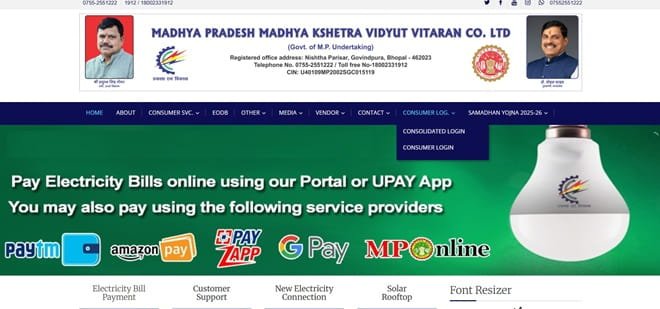
MPMKVVCL Quick Details
| Details | Information |
| Full Name | Madhya Pradesh Madhya Kshetra Vidyut Vitaran Company Limited |
| Common Name | MPMKVVCL / MPCZ |
| Service Area | Central Madhya Pradesh, including Bhopal and Gwalior regions |
| Main Services | Electricity distribution and consumer services |
| Online Bill Payment | Available |
| Bill Viewing | Available |
| Primary Consumer Identifier | IVRS Number / Account ID |
| Customer Care | 1912 / 1800-233-1912 |
| Office | Nishtha Parisar, Bijli Nagar Colony, Govindpura, Bhopal – 462023 |
| Official Website | portal.mpcz.in |
MPMKVVCL is the Madhya Kshetra company. Consumers should not accidentally use the MP Poorv (Jabalpur) or MP Paschim (Indore) bill portal, because the IVRS/Account ID is linked to the correct DISCOM database.
MPMKVVCL Login
MPMKVVCL provides Consumer Login and Consolidated Login facilities through its official portal. Registration is useful for consumers who want repeat access to bill history, payment receipts, account-linked requests and complaint functions. The portal can also expose some bill and payment services without a full dashboard login.
To access MPMKVVCL online consumer services, follow these general steps:
- Visit the official MPMKVVCL consumer portal.
- Open Consumer Login or the relevant consolidated-login option.
- Enter the registered login credentials requested by the portal.
- Complete CAPTCHA, OTP or other verification when displayed.
- Open the consumer dashboard after authentication.
- If you are a new user, use the registration option and map the correct electricity account.
- If the account cannot be identified, check the IVRS Number/Account ID on a recent bill before retrying.
MPMKVVCL consumers should keep the IVRS Number or Account ID handy. These identifiers are used across billing, complaints and account-related services and are safer for retrieval than searching only by name or address.
MPMKVVCL Electricity Bill Payment
The official MPMKVVCL website provides View/Pay Bill and related payment facilities. Consumers can also access bill payment through the UPay application and supported official payment channels.
Before payment, confirm that the portal displays the correct consumer name, connection details and amount. A mistyped IVRS Number can bring up a different account, so never proceed merely because a payable amount is displayed.
How to Pay MPMKVVCL Electricity Bill Online
The general process is:
- Open the official MPMKVVCL website and select View/Pay Bill.
- Enter the IVRS Number, Account ID or other identifier requested on the current screen.
- Complete the CAPTCHA or verification step.
- Fetch the current bill and confirm the consumer details.
- Choose the available online payment option.
- Complete payment through the authorised gateway.
- Save the transaction reference and download the receipt after successful payment.
MPMKVVCL provides separate links for payment history, bill history, previous bill download and payment-receipt download. These are useful if the consumer needs to prove an earlier transaction rather than simply paying the current bill.
If money is debited but the bill remains outstanding, first check payment history and the bank reference. Do not create a duplicate transaction until the earlier payment status has been confirmed.
How to View MPMKVVCL Electricity Bill
MPMKVVCL provides bill-view functions through its official consumer portal. Depending on the current interface, consumers can retrieve the current bill and then move to bill history or previous-bill download for older records.
Steps to View MPMKVVCL Bill
- Open the MPMKVVCL portal.
- Choose View/Pay Bill or the bill-history option.
- Enter the IVRS Number/Account ID requested by the system.
- Complete CAPTCHA or mobile verification if shown.
- Review the current bill amount, bill month and due date.
- Use Bill History or Previous Bill Download for an older billing period.
- Save the bill or receipt if you need a permanent record.
When checking a bill, compare the current meter reading, consumption, tariff/category, arrears and previous payment information rather than looking only at the final amount. MPMKVVCL also provides a bill-complaint channel if the reading or billing basis appears wrong.
How to Download MPMKVVCL Bill
Use the official Previous Bill Download, Download Bill or Payment Receipt facility after identifying the correct account. The exact label can vary between the main portal and linked consumer applications.
For a disputed payment, keep the downloaded bill, receipt, bank reference and complaint number together. This makes it easier to show what was billed, what was paid and when the complaint was registered.
MPMKVVCL Customer Care Number
MPMKVVCL lists 1912 and 1800-233-1912 for customer support. Its official portal also lists 0755-2551222, and the utility provides a WhatsApp chatbot on 0755-2551222 for services such as bill viewing and complaint registration.
When calling about an outage or billing problem, provide the IVRS Number and the registered mobile number. A properly registered complaint should generate a reference that can be used for follow-up.
| Customer Service | Contact |
| MPMKVVCL Customer Care | 1912 / 1800-233-1912 |
| Customer Support / WhatsApp | 0755-2551222 |
| Official Website | portal.mpcz.in |
MPMKVVCL Office Address
MPMKVVCL Corporate Office: Nishtha Parisar, Bijli Nagar Colony, Govindpura, Bhopal, Madhya Pradesh – 462023. The portal also publishes regional and circle-level office contacts for Bhopal, Gwalior and other operating areas.
Other MPMKVVCL Online Services
Other online facilities include payment history, bill history, receipt download, bill complaints, failure-of-supply complaints, mobile/e-mail linking, bill calculator, new electricity connections, load-related applications, solar-rooftop services and the UPay app.
Because the portal contains many service links, consumers should use the exact feature that matches the problem. A payment-status issue should be checked under payment/receipt history, while an incorrect reading or charge should be raised as a billing complaint.
Frequently Asked Questions
Q. Where can I find the MPMKVVCL IVRS Number?
The IVRS Number is printed on the electricity bill and is used by MPMKVVCL for several billing and complaint services. If an old bill shows both a service number and IVRS number, use the identifier requested by the current portal screen.
Q. Can I use WhatsApp to check an MPMKVVCL bill or register a complaint?
Yes. MPMKVVCL provides a WhatsApp chatbot on 0755-2551222. Send a message to the official number and follow the menu prompts rather than sharing banking credentials in chat.
Q. What should I do if my MPMKVVCL bill has an incorrect meter reading?
Compare the billed reading with the meter and previous consumption, keep a clear meter photograph if possible, and use the official bill-complaint facility. Save the complaint reference until the billing issue is resolved.
Q. Can I retrieve an older MPMKVVCL payment receipt?
The official portal provides payment-history and receipt-download facilities. Use the correct IVRS/Account ID and select the relevant transaction or billing period.
Q. Why is linking the correct mobile number important in MPMKVVCL?
The registered mobile number supports OTP verification, alerts and digital complaint services. If the number is outdated, use the official link/update-mobile facility so future bill and complaint actions are tied to the correct contact.



