MPPoKVVCL in this guide refers to Madhya Pradesh Poorv Kshetra Vidyut Vitaran Company Limited, the MP East distribution company headquartered in Jabalpur. The company is also commonly shown as MPPKVVCL or MPEZ on its official website and bill-payment systems, so consumers may encounter more than one abbreviation for the same utility.
For online billing, the key identifier is the IVRS Number. The official online payment system asks for this number before displaying the electricity bill. The company also provides Smart Bijlee consumer services, DigiLocker bill access, complaint support, payment locations and separate facilities for LT and HT consumers.
This article explains the current MP Poorv login and bill-payment route, how to view or download bills, which identifier to keep ready and how to contact the company when payment, meter or supply problems occur.
MPPoKVVCL Quick Details
| Details | Information |
| Full Name | Madhya Pradesh Poorv Kshetra Vidyut Vitaran Company Limited |
| Common Name | MPPKVVCL / MPEZ / MP East Discom |
| Service Area | Eastern Madhya Pradesh distribution area |
| Main Services | Electricity distribution and consumer services |
| Online Bill Payment | Available |
| Bill Viewing | Available |
| Primary Consumer Identifier | IVRS Number |
| Customer Care | 1912 |
| Office | Block No. 7, Shakti Bhawan, Rampur, Jabalpur, Madhya Pradesh |
| Official Website | mpez.co.in |
The title uses MPPoKVVCL to distinguish “Poorv,” but the company itself commonly uses MPPKVVCL and MPEZ. If a payment page is branded MPPKVVCL Jabalpur or MPEZ, it is the same MP East utility; do not confuse it with MPPKVVCL Indore/West Discom.
MPPoKVVCL Login
MP Poorv consumer services are split across the main MPEZ website, bill-payment portal and Smart Bijlee-linked services. A consumer may not need a conventional username/password merely to pay the current bill; the IVRS Number is the central identifier for retrieving a bill.
To access MPPoKVVCL online consumer services, follow these general steps:
- Visit the official MPEZ website.
- Open Consumer Services or View & Pay Your Bills Online.
- Choose the LT or HT service appropriate to the connection.
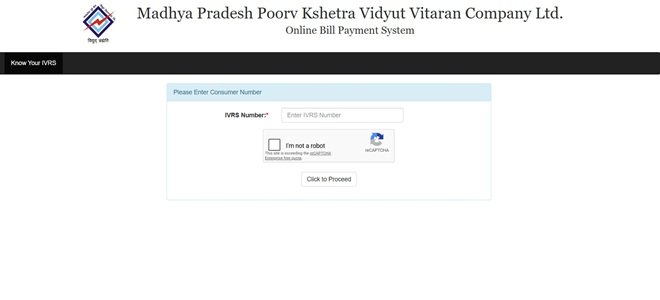
- For bill payment, enter the IVRS Number requested by the online billing system.
- For Smart Bijlee or other registered services, authenticate using the consumer details required by that service.
- Complete OTP/CAPTCHA verification when displayed.
- Open the required bill, complaint or service-request function.
The official bill-payment page specifically asks for the IVRS Number. If you do not know it, check a recent electricity bill or use the company’s “Know Your IVRS” facility rather than guessing the number.
MPPoKVVCL Electricity Bill Payment
MP Poorv provides a dedicated online bill-payment system and also lists alternative authorised channels such as MPOnline, CSC, payment gateways and ATP machines. The main online payment page begins by asking for the IVRS Number.
Consumers should verify the displayed name, bill month and payable amount before continuing. This is particularly important when paying someone else’s connection or when more than one electricity account is managed from the same phone.
How to Pay MPPoKVVCL Electricity Bill Online
The general process is:
- Open mpez.co.in and choose Pay Your Bills Online.
- Select the LT bill-payment option when applicable.
- Enter the IVRS Number in the official online billing system.
- Fetch and review the current bill details.
- Choose an available payment method or authorised gateway.
- Complete the transaction and wait for the final status.
- Download or save the payment receipt for future reference.
MP Poorv also offers a consolidated-payment facility for eligible users who need to make a single payment against multiple bills. Use that service only when the accounts have been correctly mapped and verified.
If a transaction fails after money has been debited, preserve the payment reference and check payment history before repeating the transaction. Customer care can use the IVRS Number and transaction details to investigate.
How to View MPPoKVVCL Electricity Bill
The online bill-payment page can be used to fetch the current bill after entering the IVRS Number. The company also links consumers to DigiLocker and Smart Bijlee services for digital account access.
Steps to View MPPoKVVCL Bill
- Go to the official MPEZ website.
- Open View & Pay Your Bills Online.
- Choose the appropriate LT/HT billing route.
- Enter the IVRS Number.
- Fetch the account and review bill amount, bill month and due information.
- Use DigiLocker, Smart Bijlee or linked history services when you need a stored/older record.
- Save the bill in PDF or print form if required.
If the bill amount is unexpectedly high, compare the current consumption with earlier months and check whether the bill is based on an actual or adjusted reading. Use the bill-complaint channel rather than making assumptions from the final amount alone.
How to Download MPPoKVVCL Bill
MP Poorv provides downloadable billing information through its digital consumer ecosystem, including Smart Bijlee-linked services and DigiLocker access. The exact download button may differ between the bill portal and the account service used.
A downloaded bill should be kept together with its payment receipt where proof of payment is important. This is especially useful for commercial accounts, landlords, tenants and consumers pursuing a billing correction.
MPPoKVVCL Customer Care Number
MP Poorv provides 24×7 customer-care support through 1912 for complaints and requests. The main website directs consumers to the NIDAAN/customer-call-centre system for electricity complaints.
Keep the IVRS Number and the exact supply address ready before calling. For an outage, state whether the problem affects only the premises or the surrounding area; for a billing issue, also keep the bill month and disputed charge ready.
| Customer Service | Contact |
| MP Poorv Customer Care | 1912 |
| Online Complaint System | NIDAAN / MPEZ consumer complaint portal |
| Official Website | mpez.co.in |
MPPoKVVCL Office Address
MP Poorv Corporate Office: Block No. 7, Shakti Bhawan, Rampur, Jabalpur, Madhya Pradesh. The main website also provides consumer-service links and information for offices across the distribution area.
Other MPPoKVVCL Online Services
Other online services include Smart Bijlee, new service connection applications, load change, name change, meter-related requests, solar rooftop services, scheduled-outage information, DigiLocker bill access and consumer grievance channels.
The company also provides facilities for consumer service charges and certain consolidated payments. Use the main MPEZ site as the starting point so that you reach the correct official portal for the required service.
Frequently Asked Questions
Q. What is the IVRS Number used for in MP Poorv?
It is the main consumer identifier used by the official bill-payment system and several other services. The IVRS Number is printed on the bill; enter it exactly as shown when retrieving an account.
Q. Can MP Poorv electricity bills be accessed through DigiLocker?
Yes. The MPEZ website links consumers to a DigiLocker bill facility. Availability can depend on the account and the records published to DigiLocker, so verify that the fetched document matches the correct IVRS Number.
Q. Can I pay several MP Poorv bills together?
The official MPEZ site provides a consolidated-payment facility for eligible users. It is useful for organisations or consumers managing multiple connections, but each account should be checked before a combined payment is confirmed.
Q. What should I do if the MP Poorv portal does not recognise my IVRS Number?
Recheck the number on a recent bill and make sure you are using the Jabalpur/MP East portal rather than the Madhya or Paschim DISCOM. If the identifier is still rejected, contact 1912 or the concerned local office.
Q. Is Smart Bijlee useful only for bill payment?
No. MP Poorv links Smart Bijlee to a wider set of consumer services such as applications, account-related requests and smart-meter functions. The available menu can depend on the consumer category and connection type.



