MGVCL stands for Madhya Gujarat Vij Company Limited. It distributes electricity across central Gujarat and provides consumer services through its official website, MGVCL Consumer Portal and e-Vidyut Seva. The digital system covers bill status, online payment, consumption information, complaints and several connection-related requests.
MGVCL has also introduced separate smart-meter services alongside the ordinary postpaid consumer system. This makes it important to use the correct portal for the type of meter installed at the premises. This guide explains consumer login, electricity-bill payment, bill viewing and the current customer-care channels.
MGVCL Quick Details
| Details | Information |
| Full Name | Madhya Gujarat Vij Company Limited |
| Common Name | MGVCL |
| Service Area | Central Gujarat |
| Main Services | Electricity distribution and consumer services |
| Online Bill Payment | Available |
| Bill Viewing | Available through Consumer Portal / e-Vidyut Seva |
| Payment Without Login | Available through Quick Bill Payment |
| Customer Care | 1800-233-2670 / 19124 |
| Corporate Office | Sardar Patel Vidyut Bhavan, Race Course, Vadodara |
| Official Website | mgvcl.com |
The official MGVCL website currently highlights Quick Bill Payment, MGVCL Consumer Portal, e-Vidyut Seva, online payment, complaint facilities and a Smart Meter Corner. Consumers can use these services for both ordinary and smart-meter accounts where applicable.
MGVCL Login
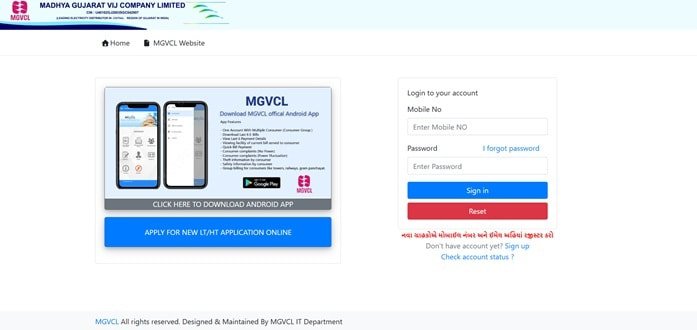
MGVCL consumers can access account services through the MGVCL Consumer Portal and e-Vidyut Seva. These platforms support bill status, consumption patterns, online payment, complaints, contact-detail updates and complaint tracking. Smart-meter users have additional meter-specific services.
To access MGVCL online consumer services, follow these general steps:
- Visit the official MGVCL website.
- Open e-Consumer Services or MGVCL Consumer Portal.
- Choose the login/account option provided by the portal.
- Enter the registered consumer/mobile credentials requested on screen.
- Complete OTP or security verification where required.
- Select the linked Consumer Number/account.
- Use the dashboard for bill status, payment, complaints or other services.
If a consumer cannot access the account, check whether the registered mobile/contact details are correct and whether the connection uses the ordinary-meter or smart-meter route. MGVCL provides separate contact-update services for supported smart-meter accounts.
MGVCL Electricity Bill Payment
MGVCL provides several online electricity-bill payment options. The official payment page currently lists payment through the MGVCL portal, Quick Payment through BillDesk, the Consumer Portal and authorised bank/payment channels.
Available digital modes include UPI, cards, net banking and other authorised methods depending on the gateway. MGVCL also supports NEFT/RTGS through prescribed virtual-account formats for consumers who prefer bank transfer.
How to Pay MGVCL Electricity Bill Online
The general process is:
- Visit the official MGVCL website.
- Select Quick Bill Payment or Online Payment.
- Choose the MGVCL portal, BillDesk or other official payment route.
- Enter the Consumer Number/account details requested.
- Fetch and verify the current bill or balance.
- Check the amount and due date.
- Choose an authorised payment method and complete the transaction.
- Save the receipt, transaction reference or payment acknowledgement.
MGVCL distinguishes between ordinary postpaid and smart/prepaid meters on its payment pages. Consumers should select the correct meter category so the payment or recharge reaches the right account system.
For NEFT/RTGS, use the virtual-account format generated for the Consumer Number and retain the UTR. Multiple or incorrect payments can require later adjustment, so the account details should be checked before transfer.
How to View MGVCL Electricity Bill
MGVCL’s Consumer Portal allows users to view bill status and consumption patterns. e-Vidyut Seva also includes bill history and bill-payment functions, while the website’s consumer tools provide shortcuts such as View Last Bill and Download Latest Bill.
Steps to View MGVCL Bill
- Open the official MGVCL website.
- Go to e-Consumer Services or the MGVCL Consumer Portal.
- Login or enter the Consumer Number as required by the service.
- Open Bill Status, Bill History or View Last Bill.
- Select the current or required bill.
- Check the bill amount, consumption and due date.
- Use Download Latest Bill where available.
- Use Past Payments or payment-history services for earlier transactions.
MGVCL’s consumer tools also provide consumption-history and past-payment options. These are useful when checking whether a sudden bill increase reflects higher energy use or a possible billing/meter issue.
Smart-meter consumers should use the Smart Meter Corner for meter-specific billing, balance and contact-detail services. Ordinary postpaid consumers can continue using the standard consumer and e-Vidyut Seva channels.
How to Download MGVCL Bill
MGVCL provides a Download Latest Bill function through its consumer tools, and registered users can access bill-history information through e-Vidyut Seva or the Consumer Portal. Save the downloaded bill if it is needed for records or a billing complaint.
Payment references and receipts should be kept until the transaction is visible in the account. Consumers using NEFT/RTGS should retain the UTR because it is the main bank-side proof for reconciliation.
MGVCL Customer Care Number
MGVCL’s centralised 24×7 customer-care numbers are 1800-233-2670 and 19124. The company also lists support.mgvcl@gebmail.com for e-payment and general support queries.
| Customer Service | Contact | ||||||
| MGVCL Customer Care | 1800-233-2670 | ||||||
| Short Helpline | 19124 | ||||||
| e-Payment Support | support.mgvcl@gebmail.com | ||||||
For complaints, keep the Consumer Number, registered mobile number, subdivision/location and a concise description of the issue ready. MGVCL also provides online complaint and complaint-tracking functions through its consumer portal.
The registered and corporate office of MGVCL is:
Sardar Patel Vidyut Bhavan, Race Course, Vadodara, Gujarat – 390007. Routine consumer work such as bill payment, complaint registration or bill download is normally faster through the portal, call centre or local subdivision office.
Other MGVCL Online Services
MGVCL digital services include bill status, bill history, consumption patterns, online payment, complaint registration/tracking, contact-detail updates, new connection/disconnection, name/load changes, smart-meter services, solar services and e-CGRF access for unresolved grievances.
Frequently Asked Questions
Q. What is the difference between MGVCL Quick Bill Payment and the Consumer Portal?
Quick Bill Payment is intended for a straightforward payment transaction, while the Consumer Portal provides a broader account view that can include bill status, consumption patterns, complaints, contact updates and tracking. Use the portal when more than payment is required.
Q. What should I do if an MGVCL payment is deducted but not reflected?
Keep the transaction reference and check past payments/payment status before paying again. If the amount remains unposted after normal processing time, contact MGVCL on 1800-233-2670 or 19124 with the Consumer Number, amount, date and payment reference.
Q. How can I investigate a sudden increase in my MGVCL bill?
Use the consumption-history facility to compare recent usage, then compare the meter reading shown on the bill with the actual meter. If the difference remains unexplained, take a dated meter photograph and register a billing or metering complaint.
Q. Do MGVCL smart-meter consumers use the same services as ordinary-meter consumers?
Some payment and account services overlap, but MGVCL maintains a Smart Meter Corner for smart/prepaid-meter functions. Consumers should use the meter-specific route when the connection has been converted to smart metering.
Q. What should I keep after paying an MGVCL bill through NEFT or RTGS?
Retain the UTR number, Consumer Number and payment date/amount. The UTR is important if the bank transfer needs reconciliation because a normal portal receipt may not be generated in the same way as a card or UPI payment.