APCPDCL stands for Andhra Pradesh Central Power Distribution Corporation Limited. It is the electricity distribution utility serving a large part of central Andhra Pradesh, including the NTR, Krishna, Guntur, Palnadu, Bapatla, Prakasam and Markapuram areas. The company provides digital services for bill viewing, online payment, consumer complaints, new connections and other electricity-related requests through its official website and Central Power mobile app.
For most routine work, consumers do not have to visit an electricity office. The APCPDCL portal can be used to check a monthly bill, make a payment, access consumer services and follow complaint-related options. This guide explains the login process, electricity bill payment, bill viewing and the main customer-care channels in a simple format.
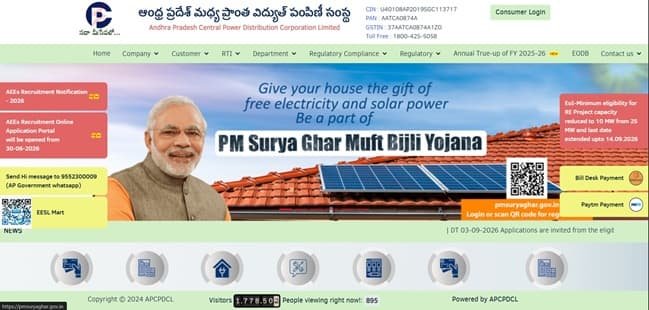
APCPDCL Quick Details
| Details | Information |
| Full Name | Andhra Pradesh Central Power Distribution Corporation Limited |
| Common Name | APCPDCL / Central Power |
| Service Area | Central Andhra Pradesh |
| Main Services | Electricity distribution and consumer services |
| Online Bill Payment | Available |
| Bill Viewing | Available |
| Payment Without Login | Available through View/Pay Bill service |
| Customer Care | 1912 / 1800-425-5058 |
| Corporate Office | Vidyut Nilayam, Gunadala, Vijayawada |
| Official Website | apcpdcl.in |
The official APCPDCL website provides consumer-facing options such as bill viewing, online payment, complaint-related services and other service requests. APCPDCL also maintains the Central Power mobile application, which provides access to monthly bills, electricity usage, complaints and connection-related services.
APCPDCL Login
APCPDCL provides a consumer portal for registered electricity consumers. Depending on the service being used, access may involve the registered consumer details and mobile-number/OTP verification. Consumers should keep the service number and registered mobile number available before starting.
To access APCPDCL online consumer services, follow these general steps:
- Visit the official APCPDCL website.
- Open the Consumer Portal, Login or the relevant online service.
- Enter the requested service or consumer details.
- Provide the registered mobile number where required.
- Complete OTP or security verification if prompted.
- Submit the details to access the consumer account.
- Use the dashboard for bills, payments, complaints or other available services.
If OTP verification fails, first check whether the mobile number linked with the electricity service is correct. Consumers can also use the official Central Power app for supported services. Avoid creating repeated accounts for the same electricity service unless the portal specifically requires a fresh registration.
APCPDCL Electricity Bill Payment
APCPDCL consumers can pay electricity bills through the official online system. The public bill-view/payment facility is useful for consumers who want to fetch the current bill and pay it without navigating through the full consumer account.
Online payment should always be started from the APCPDCL website or the official Central Power app. After the consumer details are entered, the payable amount should be checked carefully before proceeding to the payment gateway.
How to Pay APCPDCL Electricity Bill Online
The general process is:
- Visit the official APCPDCL website.
- Open the View Bill, Pay Bill or View and Pay Bill facility.
- Enter the Service Number or other accepted consumer detail.
- Complete CAPTCHA or OTP verification where required.
- Check the consumer name, bill period, due date and payable amount.
- Choose the available online payment method.
- Complete the transaction through the authorised payment gateway.
- Save the payment acknowledgement, receipt or transaction reference.
The APCPDCL bill-view system is commonly accessed with the electricity Service Number and may also offer Aadhaar-linked lookup where supported. The exact fields displayed can change when the company updates its consumer portal.
Before confirming a payment, consumers should make sure that the bill belongs to the correct service connection. OTPs, UPI PINs, card PINs and banking passwords should never be shared with callers or persons claiming to update an electricity account.
How to View APCPDCL Electricity Bill
APCPDCL provides a bill-viewing facility for consumers who want to check the current electricity demand before paying. The Central Power app can also be used to view monthly bills and electricity usage for a linked consumer account.
Steps to View APCPDCL Bill
- Go to the official APCPDCL website.
- Select the bill-view or View and Pay Bill option.
- Enter the electricity Service Number or accepted consumer identifier.
- Enter the linked details requested by the portal, if any.
- Complete CAPTCHA, OTP or other verification shown on the screen.
- Submit the information.
- Check the bill amount, due date and consumer details.
- Use the available option to proceed to payment or save the bill information.
The service number is the key identifier for most APCPDCL consumer transactions. It should be copied exactly from the electricity bill. If the portal does not recognise a number, check for typing errors and make sure the connection actually belongs to APCPDCL rather than APEPDCL or APSPDCL.
Registered users and Central Power app users may also be able to review monthly usage, bill-related information and payment-related records. Smart-meter consumers can find additional consumption information where the service has been enabled.
How to Download APCPDCL Bill
After locating the electricity bill, use the bill or receipt options provided by the portal or app to save the available record. Some APCPDCL services provide bill information directly on screen, while receipt or payment-history options may appear separately after a successful transaction.
Keeping the latest bill and payment acknowledgement is useful if a payment is not immediately reflected, a billing dispute arises or proof of electricity payment is required later.
APCPDCL Customer Care Number
For electricity complaints and consumer assistance, APCPDCL consumers can use 1912. APCPDCL also lists 1800-425-5058 as a toll-free support number. These channels can be used for supply, billing and other electricity-related issues.
| Customer Service | Number |
| APCPDCL Customer Care | 1912 |
| Toll-Free Support | 1800-425-5058 |
| Central Power App Support | 9440847875 |
Consumers can also use the complaint facilities available through the APCPDCL portal and Central Power app. Keep the service number, registered mobile number and a clear description of the problem ready. If a complaint number is generated, save it until the issue is resolved.
The APCPDCL corporate office is currently associated with Vidyut Nilayam in Vijayawada:
Vidyut Nilayam, Gunadala, Vijayawada, Andhra Pradesh – 520004. The new corporate office at Gunadala was inaugurated in 2026. Routine consumer work such as bill payment or complaint registration should normally be handled through the online channels, 1912 or the local electricity office.
Other APCPDCL Online Services
Apart from bill payment and viewing, APCPDCL provides facilities connected with consumer complaints, new electricity connections, service requests, electricity-usage information and smart-meter monitoring. The Central Power app also supports consumer-facing functions such as monthly bill viewing and complaint registration.
Frequently Asked Questions
Q. What should I do if an APCPDCL payment is deducted but the bill still shows unpaid?
Do not pay the same bill again immediately. Keep the bank, card or UPI transaction reference and check the payment status after allowing time for reconciliation. If the amount remains unposted, contact APCPDCL on 1912 or use the complaint facility with the service number and transaction details.
Q. Why am I not receiving an OTP on the APCPDCL consumer portal?
OTP problems usually require checking whether the correct mobile number is linked with the electricity service and whether the phone can receive messages. If repeated attempts fail, use the official customer-care channel or local office to verify or update the registered mobile details instead of repeatedly creating new accounts.
Q. How can I tell whether my connection belongs to APCPDCL?
Check the electricity bill for the distributor name and service details. APCPDCL serves central Andhra Pradesh areas, while other parts of the state are served by APEPDCL or APSPDCL. Using the wrong DISCOM portal will normally result in the service number not being found.
Q. What should I do if my APCPDCL bill shows an unusually high reading?
Compare the current meter reading with the reading printed on the bill and review recent consumption if available in the app. If there is a clear mismatch or unexplained jump, take a dated meter photograph and register a billing or meter complaint with APCPDCL.
Q. Can the Central Power app be used instead of the APCPDCL website?
Yes, for many supported consumer services. The official Central Power app provides access to monthly bills, usage information, complaints and connection-related facilities. For important transactions, keep the payment receipt or complaint reference regardless of whether the app or website is used.



