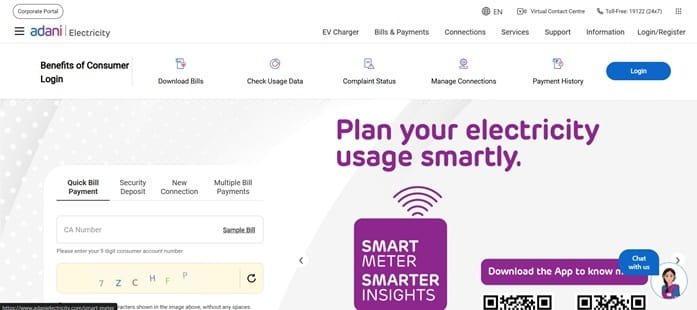
AEML stands for Adani Electricity Mumbai Limited, an electricity distribution utility serving consumers in Mumbai and adjoining licensed areas. Its consumer website is built around the Consumer Account or CA Number and provides Quick Bill Payment, registered account access, complaint registration, payment services and digital self-service options.
The most important detail to keep ready is the 9-digit CA Number printed on the electricity bill. AEML’s Quick Pay page can fetch bill details directly from this number, so a consumer does not need to create an account merely to make a one-time payment. Registered users, however, receive broader access to account information and complaint tracking.
This guide explains AEML login, quick and registered bill payment, how to view bill details, customer-care number 19122 and practical support channels for no-supply, billing and payment problems.
AEML Quick Details
| Details | Information |
| Full Name | Adani Electricity Mumbai Limited |
| Common Name | AEML / Adani Electricity |
| Service Area | Licensed distribution area in Mumbai and adjoining suburbs |
| Main Services | Electricity distribution and consumer services |
| Online Bill Payment | Available |
| Bill Viewing | Available |
| Primary Consumer Identifier | 9-digit CA Number |
| Customer Care | 19122 |
| Office | Devidas Lane, Off S.V.P. Road, Borivali (West), Mumbai – 400103 |
| Official Website | adanielectricity.com |
AEML Quick Pay specifically asks for the 9-digit Consumer Account (CA) Number. Consumers should enter that number from the latest bill and verify the displayed name and bill month before paying.
AEML Login
AEML provides Login/Register access for consumers who want an authenticated account. Registered users can see account-related information, use support services and track complaints. The company’s complaint-handling process specifically directs consumers to register and login for online complaint functions.
To access AEML online consumer services, follow these general steps:
- Visit the official Adani Electricity website.
- Select Login/Register.
- Register the account if you are a first-time user and validate the required consumer details.
- Enter the registered login credentials.
- Complete OTP or security verification when prompted.
- Open the consumer dashboard and select bill, payment or support services.
- Use account recovery if you cannot access the registered profile.
For a one-time bill payment, a registered login is not compulsory. AEML Quick Pay allows the current bill to be fetched with the 9-digit CA Number.
AEML Electricity Bill Payment
AEML provides a dedicated Quick Bill Payment page. After the CA Number is entered, the system displays bill details such as consumer name, bill month, units consumed, total bill amount and minimum payable amount.
Consumers should review these fields before moving to the payment gateway. AEML supports multiple digital payment methods, and registered users can also manage payment-related services from their account.
How to Pay AEML Electricity Bill Online
The general process is:
- Open the official Adani Electricity website.
- Choose Quick Bill Payment or Pay Your Bill.
- Enter the 9-digit CA Number.
- Fetch and verify the bill details shown on the screen.
- Choose the payable option and preferred authorised payment mode.
- Complete the transaction through the payment gateway.
- Save the transaction reference/receipt and check the account after processing.
AEML states that a successful payment receives a transaction reference number that serves as an acknowledgement. Website reflection can take additional time even after the bank has been debited, so keep the reference until the account is updated.
If a payment appears stuck, do not automatically pay twice. Check the account and payment status first and call 19122 if the transaction does not reconcile.
How to View AEML Electricity Bill
The Quick Pay screen itself displays key bill information after a valid CA Number is entered. Registered account access provides a more complete way to review the consumer account and support history.
Steps to View AEML Bill
- Go to adanielectricity.com.
- Open Quick Bill Payment or Login to the registered account.
- Enter/select the 9-digit CA Number.
- Fetch the account and check the consumer name.
- Review bill month, units consumed, total bill amount and minimum payable information.
- Use the registered account for deeper billing/history functions where available.
- Save or download the bill/receipt through the option provided.
If the bill shows an unexpected amount, compare the units consumed, billing period and previous payment/arrears. For a suspected meter or billing error, register a complaint through the official support route rather than relying only on a payment-page summary.
How to Download AEML Bill
Registered AEML consumers can use account services to keep digital bill and payment records. Where the portal provides a bill PDF or print option, select the required billing period and save it locally.
For payment disputes, preserve both the energy bill and the transaction reference. They provide different evidence: the bill shows what was due, while the receipt/reference shows what was paid.
AEML Customer Care Number
AEML’s 24×7 customer-care helpline is 19122. The company also supports digital complaint registration through the website and provides additional channels such as WhatsApp/no-supply support.
For a first online complaint, login and go to Help & Support > Register Complaint, select the category/sub-category and submit the details. The complaint can then be tracked online, with escalation routes available if the consumer is not satisfied.
| Customer Service | Contact |
| AEML Customer Care | 19122 |
| WhatsApp / Digital Support | 9594519122 |
| Official Website | adanielectricity.com |
AEML Office Address
AEML Head Office: CTS 407/A (New), Village Eksar, Off S.V.P. Road, near Devidas Lane Telephone Exchange, Borivali (West), Mumbai – 400103. Most consumer complaints should begin with 19122 or the online complaint system rather than a head-office visit.
Other AEML Online Services
AEML digital services include Quick Pay, registered-account management, complaint registration and tracking, payment services, paperless billing options and self-help channels. The website also explains escalation from the first complaint to the Internal Complaint Redressal System and then the Consumer Grievance Redressal Forum where applicable.
For no-supply complaints, AEML provides multiple channels, but consumers should use only official numbers/accounts. Fraudulent disconnection calls often ask for immediate payment or remote screen access; AEML does not require a consumer to disclose UPI PINs or banking passwords to a caller.
Frequently Asked Questions
Q. Where can I find the AEML CA Number?
The 9-digit CA Number is printed on the Adani Electricity bill and identifies the consumer account. It is the number required by the Quick Pay service.
Q. Can I make an AEML payment without creating an online account?
Yes. AEML Quick Pay allows a bill to be fetched and paid using the 9-digit CA Number. Registration is more useful when you need account history, complaints or other ongoing services.
Q. Why can an AEML payment take time to appear on the website?
AEML notes that payment posting and website reflection can take additional processing time. Keep the transaction reference and avoid a duplicate payment while the first transaction is being reconciled.
Q. How do I escalate an unresolved AEML complaint?
Start with the first complaint through the official support system. If the complaint is closed without satisfactory resolution or the applicable resolution period expires, the AEML process provides escalation to ICRS and, subsequently, the Consumer Grievance Redressal Forum where eligible.
Q. Can I use WhatsApp for an AEML no-supply issue?
AEML provides WhatsApp/digital support on 9594519122. Use the official business account and never share banking PINs, passwords or screen-control access in chat.



