MPD stands for Power & Electricity Department, Government of Mizoram. It provides electricity distribution and consumer services for Mizoram. For most consumers, the practical online tasks are checking the current bill, paying it before the due date, retrieving earlier payment details, and raising a complaint when supply or billing information does not look right.
MPD in this guide refers to Mizoram’s Power & Electricity Department. Unlike many corporate DISCOMs, the department’s public website is primarily an official information and departmental portal. Consumers may encounter separate billing/payment arrangements, BBPS-supported channels or newer digital services as the department modernises its billing system. For that reason, it is important not to assume that an old login page is still the current payment route.
This guide focuses on what a consumer actually needs to do: use the correct Consumer / electricity account number, choose the right official payment or self-service channel, verify the bill before paying, save the receipt, and know where to contact MPD if an online transaction or electricity service needs attention.
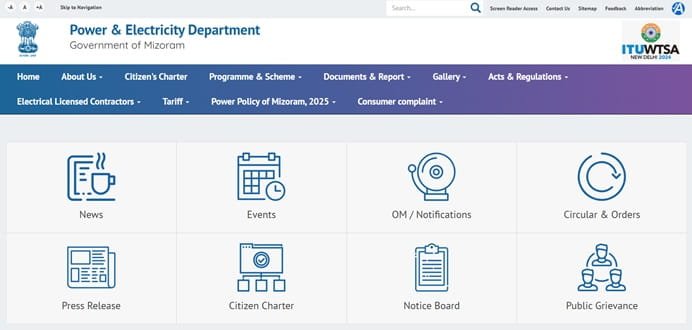
MPD Quick Details
| Details | Information |
| Full Name | Power & Electricity Department, Government of Mizoram |
| Common Name | MPD |
| Service Area | Mizoram |
| Main Consumer Identifier | Consumer / electricity account number |
| Online Bill Payment | Available |
| Bill Viewing | Available |
| Customer Care | 1912 |
| Official Website | power.mizoram.gov.in |
The exact screen can vary by consumer category and meter type, so the Consumer / electricity account number printed on the latest bill remains the safest reference when using online services.
MPD Login
The public MPD website does not consistently expose a single corporate-style consumer login on its main pages. Where the department or its current billing platform presents a consumer portal, use the registration/login instructions shown there and verify that the page is linked from an official Mizoram government source. Do not enter account credentials into an old bookmarked or third-party page simply because it carries the department name.
Consumers who use the account regularly should keep the mobile number linked to the electricity connection active. OTP-based verification, password recovery and service alerts depend on the registered contact details on many modern utility portals.
- Open the official MPD website or its linked consumer self-service portal.
- Choose Login, Consumer Portal or Web Self Service, depending on the wording shown.
- Enter the registered mobile number/user credential and the required Consumer / electricity account number.
- Complete password, OTP or CAPTCHA verification if requested.
- After authentication, open the bill, payment history, complaint or account service you need.
- If you are a first-time user, use the registration option and map the electricity connection to your profile.
Important About MPD Online Services
Because MPD is a government department rather than a separately branded distribution company, its public website and billing platform may not look like the consumer portals used by private DISCOMs. This guide therefore avoids inventing a fixed username/password process where the live official service does not clearly require one.
MPD Electricity Bill Payment
For MPD bills, use the current official payment route linked by the department or a recognised BBPS-enabled payment channel. Enter the consumer/account information exactly as printed on the bill and confirm the displayed name, billing period and payable amount before completing payment.
Before authorising payment, match the consumer name or connection details and the payable amount with your electricity account. This simple check is especially useful when a family member manages more than one connection.
- Go to the official MPD payment or consumer-service page.
- Enter the Consumer / electricity account number and any mobile number or security details requested.
- Load the current outstanding bill and verify the amount and due date.
- Choose the payment option offered by the portal, such as UPI, net banking, card or an integrated payment gateway.
- Complete the transaction without refreshing or repeatedly pressing the payment button.
- Save the acknowledgement, transaction ID or receipt after payment.
How to View MPD Electricity Bill
Bill visibility can depend on the billing system currently serving the connection. Where a web self-service bill page is available, use the consumer/account number from the latest bill. If the public portal does not return the record, contact the local Power & Electricity office instead of guessing at alternate identifiers.
- Open the official MPD bill-view or consumer portal.
- Enter the required Consumer / electricity account number.
- Complete OTP/CAPTCHA authentication if the page asks for it.
- Open the current bill or bill-history section.
- Check the billing period, meter reading, units consumed, arrears, adjustments and due date.
- Download or save the bill if the portal provides a PDF or print option.
How to Download MPD Bill or Payment Receipt
When a downloadable bill or receipt is available, save it directly from the consumer dashboard or payment-history section. A stored receipt is useful if the account does not update immediately, if a duplicate payment dispute arises, or if proof of payment is needed later. If the portal opens the bill in a new window, browser pop-up settings may need to allow the official MPD domain.
MPD Customer Care Number
For electricity supply, billing, meter or payment-related issues, consumers should use the official MPD complaint channels. Keep the Consumer / electricity account number, registered mobile number, complaint details and transaction reference ready before calling.
| Customer Service | Details |
| Customer Care / Complaint | 1912 |
| Official Website | power.mizoram.gov.in |
When Online Payment Is Debited but the Bill Is Still Unpaid
Do not immediately pay the same MPD bill again. First check the payment history and bank/UPI status. Payment gateways can occasionally take time to reconcile with the utility account. Keep the transaction ID, amount, date and screenshot or bank reference. If the payment remains unposted, contact MPD customer care and share these details.
Other Useful MPD Consumer Services
Mizoram’s Power & Electricity Department is in the process of strengthening digital consumer services, including consumer portal/app capabilities, bill summaries, PDF bill access, online payments, consumption history and complaint/service-request integration. Consumers should therefore rely on the current department portal rather than screenshots or instructions from older billing systems.
- Bill and payment-history access where enabled
- Complaint registration and status tracking
- Mobile-number or profile management where supported
- New connection or service-request facilities where available
- Consumption or meter information on supported accounts
Safety While Paying Electricity Bills Online
Use the official MPD website, its recognised app or a trusted bill-payment channel. Do not share OTPs, UPI PINs, card PINs or internet-banking passwords with anyone who claims that the connection will be disconnected immediately. A genuine payment page will ask you to authenticate through the bank or payment provider; a caller should never need your secret PIN.
Frequently Asked Questions
Q. Why can an old MPD payment link stop working even if it worked before?
The department’s billing and consumer-service systems can be upgraded or migrated. Use the latest link provided by the official Mizoram Power & Electricity Department rather than an old bookmark.
Q. Can I pay a Mizoram electricity bill through BBPS?
Recognised BBPS channels may support electricity payments where the MPD biller and consumer account are available. Always verify the consumer name and outstanding amount returned before paying.
Q. What if my bill is not generated or I cannot find it online?
Contact the concerned subdivision/division with the consumer number and meter details. A missing bill can be a billing-system or meter-reading issue, and repeated payment attempts will not fix it.
Q. How should I report a wrong meter reading on an MPD bill?
Take a clear photo of the meter reading and contact the local electricity office or complaint channel promptly. Keep the bill and complaint acknowledgement until the correction is reflected.
Q. Is a third-party app showing my Mizoram bill safe to use?
Use only established BBPS/payment providers and verify that the biller is the Mizoram Power & Electricity Department. For account corrections, disputes and official records, rely on the department’s own channels.
Q. What should I keep after paying an MPD bill online?
Keep the payment receipt, transaction ID, date, amount and consumer number until the payment appears in the electricity account. These details are essential if reconciliation is delayed.



