GESCOM stands for Gulbarga Electricity Supply Company Limited. It is the electricity distribution utility serving its assigned area in the Kalyana Karnataka region. The company has expanded online consumer services so bill payment, bill viewing, account registration, new-connection applications and several service changes can be initiated digitally.
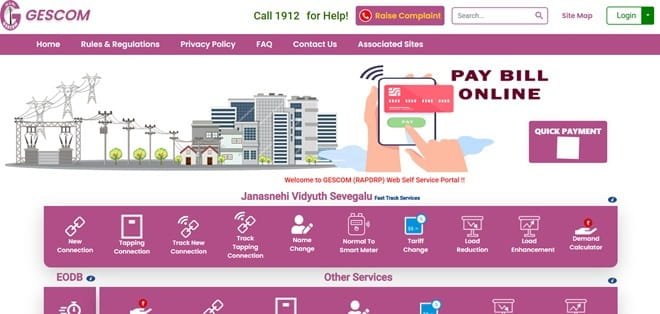
The current GESCOM consumer system provides Customer Login, quick payment, last online payment status and fast-track electricity services. Registered consumers can use Account Summary, View/Pay Bill, consumption history, billing and payment history, profile services and complaint or service-request features. Many routine services can therefore be handled online with the Account ID shown on the electricity bill.
This article explains GESCOM login, online electricity bill payment, how to view or download a bill, customer care details and other practical digital services available to electricity consumers.
GESCOM Quick Details
| Details | Information |
| Full Name | Gulbarga Electricity Supply Company Limited |
| Common Name | GESCOM |
| Service Area | GESCOM distribution area in Kalyana Karnataka |
| Main Services | Electricity distribution and consumer services |
| Online Bill Payment | Available |
| Bill Viewing | Available |
| Primary Consumer Identifier | 10-digit Account ID / RR Number |
| Customer Care | 1912 |
| Office | Corporate Office, Station Road, Kalaburagi, Karnataka – 585102 |
| Official Website | gescom.karnataka.gov.in |
The official consumer system currently uses the GESCOM Consumer Portal. Consumers should enter the identifier exactly as printed on a recent bill and verify the consumer name, service address and payable amount before completing an online transaction.
GESCOM Login
GESCOM provides a registered consumer portal with User ID and password login. New users can register with the Account ID printed on the electricity bill, while forgotten User IDs or passwords can be recovered through the available portal options.
To access GESCOM online consumer services, follow these general steps:
- Open the official GESCOM website or consumer portal.
- Select Customer Login.
- Enter the registered User ID.
- Enter the password.
- Complete the image CAPTCHA and select Login.
- If you are a new user, choose registration and enter the Account ID printed on the bill.
- Use the credential-recovery options if the User ID or password has been forgotten.
GESCOM follows the same basic consumer-account structure used by Karnataka ESCOM portals. The Account ID is the primary identifier for portal registration, while the RR Number remains the power-supply connection reference. Consumers should copy the Account ID directly from a recent bill to avoid linking the wrong connection.
GESCOM Electricity Bill Payment
GESCOM consumers can pay electricity dues online through the authorised consumer portal. A quick-payment facility is available so the current bill can generally be paid without completing full account login or portal registration.
Before payment, keep a recent electricity bill ready. Confirm the consumer identifier, name, service address and amount displayed on the screen. If any of these details do not match the intended connection, stop before authorising the transaction.
How to Pay GESCOM Electricity Bill Online
The general process is:
- Visit the GESCOM official consumer portal.
- Choose Quick Payment when you only need to clear the current bill.
- Enter the Account ID or other consumer details requested on the payment page.
- Fetch the bill and verify the consumer name and payable amount.
- Select the available online payment method.
- Complete the payment through the authorised gateway.
- Save the acknowledgement and use Last Online Payment Status if the posting needs to be checked.
Registered consumers can login and pay from Account Summary or View/Pay Bill after selecting the correct Account ID. The quick-payment route is useful for a one-time bill payment, while registration is more useful when the consumer wants billing history, consumption history, profile management or service requests.
After payment, do not close the payment page until the final transaction status is displayed. Save the receipt, acknowledgement or transaction reference because it can be useful if the payment takes time to appear in the electricity account.
If the bank account is debited but GESCOM does not immediately show the payment, avoid making a duplicate payment until the transaction status has been checked. Payment gateways and banks may require time to reconcile a successful transaction.
How to View GESCOM Electricity Bill
GESCOM provides online bill access through its consumer system. Registered users get the most complete access because they can open account information, the current bill and earlier billing or payment records from one dashboard.
Steps to View GESCOM Bill
- Login to the GESCOM Consumer Portal.
- Open Account Summary or View/Pay Bill.
- Select the required Account ID.
- Open the current bill details.
- Check meter-related information, consumption, amount payable and due date.
- Use Billing and Payment History for previous periods.
- Download or print the detailed bill where the portal provides the option.
When checking a bill, look beyond the total amount. Review the billing period, previous and current meter reading, units consumed, tariff/category, fixed or demand charges, arrears or adjustments and the payment due date. This makes it easier to identify a billing discrepancy before payment.
How to Download GESCOM Bill
Where the GESCOM consumer portal provides a detailed bill PDF, printable bill view or e-bill, open the required billing period and use the download or print option. Registered consumers generally have better access to previous billing records than users making only a quick payment.
Saving the bill and payment receipt is useful for reimbursement, address verification, tenant-landlord reconciliation, accounting records and future billing disputes. Keep the original digital receipt until the payment is clearly reflected in the consumer account.
GESCOM Customer Care Number
The principal electricity helpline for GESCOM consumers is 1912. It can be used for power-supply complaints and other electricity-related issues. Consumers should use official channels rather than calling numbers received in unverified disconnection messages or payment alerts.
| Customer Service | Contact |
| GESCOM Customer Care | 1912 |
| Official Website | gescom.karnataka.gov.in |
When registering a complaint, keep the consumer identifier, registered mobile number, exact service address and a short description of the problem ready. If a complaint number or docket number is generated, save it until the issue is closed.
GESCOM Office Address
The relevant corporate office information is: Corporate Office, Station Road, Kalaburagi, Karnataka – 585102. Routine bill payment, bill viewing and common consumer requests can usually be handled through online services or the local subdivision office, so a visit to the corporate office is generally unnecessary.
Other GESCOM Online Services
GESCOM’s online services include quick payment, last-payment-status checking, new connection and tapping connection, name change, tariff change, load reduction, load enhancement, demand calculation and online tracking. Its customer portal also supports account summary, billing and payment history, consumption history, profile update and service requests or complaints.
Availability can depend on consumer category, meter type, service area and whether the account has been migrated to a newer billing or smart-meter platform. Consumers should use the service options currently displayed after entering or linking their own account.
Frequently Asked Questions
Q. What is the difference between a GESCOM RR Number and Account ID?
The RR Number identifies the physical power-supply connection, while the Account ID is a 10-digit unique number used for GESCOM’s consumer portal and online account management. Both are printed on the electricity bill.
Q. Can I pay a GESCOM amount in advance?
Yes. GESCOM’s consumer guidance provides an advance bill-payment facility in the customer portal. Before entering an advance amount, verify the Account ID and make sure the payment is being made to the intended connection.
Q. What should I do if a GESCOM payment is debited but the portal does not generate a receipt?
Avoid making a duplicate payment immediately. Keep the bank, card or UPI transaction reference and check Last Online Payment Status. Payment-gateway reconciliation can take time, and a second payment may create an unnecessary excess balance.
Q. Can I track a GESCOM service request online?
Yes. GESCOM provides online tracking for several consumer services. The portal includes Account ID-based service-request tracking as well as tracking for new connections and other applications.
Q. Why might an Additional Security Deposit appear in a GESCOM bill?
ASD means Additional Security Deposit. Karnataka electricity regulations require consumers to maintain the prescribed security deposit with the distribution licensee, so an additional demand can arise when the required deposit is higher than the amount already held.



