BYPL stands for BSES Yamuna Power Limited. It distributes electricity across East and Central Delhi and provides a broad range of consumer services through the BSES Delhi website, BYPL Connect mobile app and WhatsApp. Routine work such as paying a bill, downloading a duplicate bill or registering a no-supply complaint can usually be handled digitally.
The 9-digit CA Number printed on the electricity bill is the main identifier for BYPL consumers. It is used for Quick Pay, account recovery and many customer-service functions. This guide covers BYPL login, online electricity-bill payment, how to view or obtain a bill and the main customer-care channels.
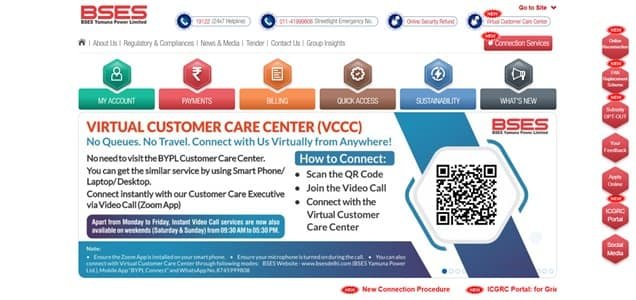
BYPL Quick Details
| Details | Information |
| Full Name | BSES Yamuna Power Limited |
| Common Name | BYPL |
| Service Area | East and Central Delhi |
| Main Services | Electricity distribution and consumer services |
| Online Bill Payment | Available |
| Bill Viewing | Available through My Account and digital services |
| Payment Without Login | Available through Quick Pay |
| Customer Care | 19122 |
| Corporate Office | Shakti Kiran Building, Karkardooma, Delhi |
| Official Website | bsesdelhi.com |
The BYPL portal provides My Account login, Quick Pay, current/duplicate-bill services, complaint facilities and e-bill options. Its verified WhatsApp service also supports duplicate bills, payment and bill status, no-power complaints and other common requests.
BYPL Login
BYPL has a My Account login for registered consumers. The current login page asks for a username, password and CAPTCHA. Consumers who have not created an account can complete registration using their connection and contact details.
To access BYPL online consumer services, follow these general steps:
- Visit the official BSES Delhi website and select BYPL.
- Open My Account or User Login.
- Enter the registered username.
- Enter the password and complete CAPTCHA verification.
- Click Login.
- If the account is new, use the registration option and provide the required CA Number and consumer details.
- After login, open bill, payment, complaint or account services as required.
BYPL provides Forgot Username and Forgot Password facilities. The Forgot Username process uses the CA Number, which is why consumers should keep a recent electricity bill available when recovering access.
BYPL Electricity Bill Payment
BYPL provides a Quick Pay facility for straightforward bill payment without opening the full account dashboard. The page uses the 9-digit CA Number and security verification to fetch the electricity account.
Consumers can also pay through the BYPL Connect app and other authorised modes. Bank-transfer options such as NEFT/RTGS are supported through prescribed beneficiary-account formats for consumers who prefer direct bank payment.
How to Pay BYPL Electricity Bill Online
The general process is:
- Open the BYPL section of the official BSES Delhi website.
- Select Quick Pay.
- Enter the 9-digit CA Number.
- Complete the CAPTCHA/security verification.
- Fetch and check the current bill details.
- Verify the amount and due date.
- Select an available authorised payment method and complete payment.
- Save the acknowledgement or payment receipt.
Before payment, compare the consumer details shown on screen with the electricity bill. This simple check is important because the CA Number identifies the account that will receive the payment.
BYPL consumers using NEFT/RTGS should follow the company’s prescribed beneficiary-code format and pay the full amount. The bank UTR should be saved until the payment is reflected in the electricity account.
How to View BYPL Electricity Bill
BYPL allows consumers to view and download electricity bills through its digital services. The website indicates that signed-in consumers can access bills for previous months and the current month’s payment receipt.
Steps to View BYPL Bill
- Go to the BYPL website.
- Sign in to My Account.
- Select the electricity account linked with the CA Number.
- Open the bill details or download-bill service.
- Choose the current or required billing period.
- Review the payable amount, due date and bill information.
- Download or print the bill copy if needed.
- Check payment status or receipt information separately where required.
BYPL WhatsApp at 8745999808 can provide a duplicate bill and bill/payment status when the request is made through supported verification. The company advises consumers to use the registered mobile number for account-specific services.
Consumers can also use BYPL short-code and mobile-app services for selected billing information. My Account remains useful when a broader billing history or multiple online services are required.
How to Download BYPL Bill
The current or duplicate bill can be saved from the website after account access, and BYPL also supports bill delivery through its digital channels. A downloaded copy is useful for checking the meter reading and charges before raising a billing query.
Keep the payment receipt separately after paying the bill. A receipt is particularly useful when a payment has been made near the due date or when the online account has not yet updated.
BYPL Customer Care Number
BYPL customer care is available at 19122, a 24×7 toll-free helpline. Consumers can use it for supply, billing, meter and service-related problems. BYPL also provides email and digital complaint channels.
| Customer Service | Contact | ||||||
| BYPL Customer Care | 19122 | ||||||
| BYPL WhatsApp | 8745999808 | ||||||
| Customer Care Email | bypl.customercare@reliancegroupindia.com | ||||||
The official BYPL WhatsApp number is 8745999808. It supports several self-service functions, including duplicate bills, payment/bill status and no-power complaints. Consumers should verify that they are communicating with the official number before sharing account information.
The registered office of BYPL is:
Shakti Kiran Building, Karkardooma, Delhi – 110032. Routine consumer requests are generally better handled through 19122, the website, BYPL Connect, WhatsApp or the relevant Digisewa/customer-service centre.
Other BYPL Online Services
BYPL digital services include duplicate bills, e-bill options, bill/payment status, no-current complaints, self-meter reading, street-light complaints, new-connection status and customer-care support through BYPL Connect and WhatsApp.
Frequently Asked Questions
Q. What should I do if a BYPL payment is deducted but not reflected?
Keep the transaction reference and check bill/payment status before making another payment. If the amount is still not posted after normal reconciliation time, call 19122 and provide the CA Number, amount, payment date and bank/UPI reference.
Q. Can I obtain a BYPL duplicate bill without waiting for a paper copy?
Yes. A duplicate bill can be obtained through BYPL digital channels, including My Account, BYPL Connect and the verified WhatsApp service. Requests for account-specific information should preferably be made from the registered mobile number.
Q. What should I do if my BYPL bill shows a meter reading that does not match the meter?
Take a clear dated photograph of the meter display and compare it with the reading and bill date. Register a billing or metering complaint through BYPL and keep the complaint number until the correction or explanation is completed.
Q. Can BYPL consumers pay through NEFT or RTGS?
Yes. BYPL provides a prescribed SBI virtual-account format for post-paid energy-bill payments. Consumers should use the correct beneficiary code plus the 9-digit CA Number, pay the full amount and retain the UTR reference.
Q. How can I verify a BYPL message that warns of immediate disconnection?
Do not use a number or payment link supplied in a suspicious message. Check the actual bill through the official website/app or call 19122. BYPL also publishes its verified WhatsApp number, 8745999808, for official digital interaction.



