BRPL stands for BSES Rajdhani Power Limited. It is one of Delhi’s major electricity distribution companies and serves a large consumer base across South and West Delhi. BRPL has moved many routine services online, including electricity-bill payment, account login, duplicate-bill access, e-bill registration and complaint handling.
For consumers, the most important identifier is the 9-digit CA Number printed on the electricity bill. It is used for Quick Pay, account registration and several digital services. This guide explains how to sign in to BRPL My Account, pay a bill, view or download bill information and reach customer care when a billing or supply issue needs attention.
BRPL Quick Details
| Details | Information |
| Full Name | BSES Rajdhani Power Limited |
| Common Name | BRPL |
| Service Area | Large parts of South and West Delhi |
| Main Services | Electricity distribution and consumer services |
| Online Bill Payment | Available |
| Bill Viewing | Available through My Account and duplicate-bill services |
| Payment Without Login | Available through Quick Pay |
| Customer Care | 19123 |
| Corporate Office | BSES Bhawan, Nehru Place, New Delhi |
| Official Website | bsesdelhi.com |
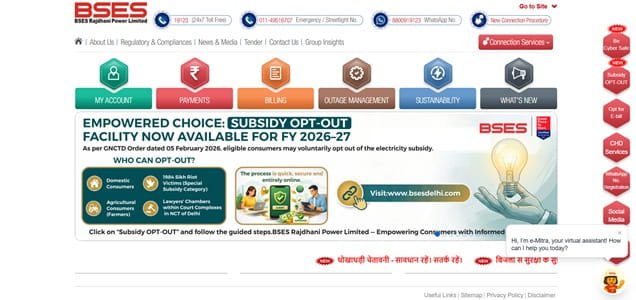
The BRPL website provides My Account login, Quick Pay, duplicate-bill services, e-bill registration and complaint-related facilities. Consumers can also use the BRPL Power App and the company’s verified WhatsApp channel for selected services.
BRPL Login
BRPL has a My Account facility for registered consumers. The current login page uses a username and password with CAPTCHA verification. New users can create an account by providing personal details along with the 9-digit CA Number and meter number.
To access BRPL online consumer services, follow these general steps:
- Visit the official BSES Delhi website and select BRPL.
- Open My Account or User Login.
- Enter the registered username.
- Enter the password and complete CAPTCHA verification.
- Click Login to access the consumer account.
- If not registered, open New User Sign Up and enter the required details, including CA Number and meter number.
- After login, use bill, payment, profile or request services as needed.
BRPL provides separate Forgot Username and Forgot Password options. If the username is forgotten, the CA Number can be used in the recovery process. Consumers should avoid sharing their account password, OTP or payment PIN with anyone claiming to be from the electricity company.
BRPL Electricity Bill Payment
BRPL provides a Quick Pay facility for consumers who want to pay the current electricity bill without entering the full My Account dashboard. The payment screen asks for the CA Number and security verification before the bill is fetched.
Registered users can also pay from within their account and review payment-related information. BRPL supports multiple authorised digital payment modes, and NEFT/RTGS is available for consumers who prefer bank transfer using the prescribed virtual-account format.
How to Pay BRPL Electricity Bill Online
The general process is:
- Open the BRPL section of the official BSES Delhi website.
- Select Quick Pay or the bill-payment option.
- Enter the 9-digit CA Number.
- Complete the CAPTCHA/security verification.
- Fetch and verify the current bill details.
- Check the payable amount and due date.
- Choose an available authorised payment method and complete the transaction.
- Save the payment acknowledgement or receipt for your records.
The CA Number should be checked carefully before payment because it identifies the electricity account. A wrong number can lead to a payment being made against another connection if the consumer details are not reviewed before confirmation.
For bank-transfer payments, BRPL advises consumers to use the prescribed beneficiary/virtual-account format and pay the full bill amount. Consumers using NEFT/RTGS should initiate the transfer sufficiently before the due date and preserve the UTR number.
How to View BRPL Electricity Bill
BRPL consumers can view and download electricity bills through My Account. The official website states that logged-in consumers can access electricity bills for previous months along with the current month’s payment receipt.
Steps to View BRPL Bill
- Open the BRPL website.
- Sign in to My Account using the registered username and password.
- Select the linked electricity account.
- Open Bill Details or the duplicate-bill facility.
- Choose the current bill or required billing period.
- Check the bill amount, due date and meter information.
- Download or print the duplicate bill if required.
- Use the payment-history or receipt facility for payment records.
BRPL also provides alternative duplicate-bill services through its mobile app and WhatsApp channel. The consumer should use the registered mobile number where verification is required.
For e-bill registration without a full My Account login, BRPL asks for a valid 9-digit CA Number and registered mobile number. Consumers should keep their email address updated so future electronic bills are delivered correctly.
How to Download BRPL Bill
A duplicate BRPL bill can be downloaded after login and through the company’s supported bill-copy services. Keeping a digital copy is useful for checking meter readings, tariff components, arrears and payment due dates.
Payment receipts should be saved separately from the electricity bill. If a transaction later needs to be traced, the CA Number, transaction reference, date and amount are the most useful details.
BRPL Customer Care Number
BRPL customer care is available at 19123, a 24×7 toll-free helpline. Consumers can use it for supply, billing, metering and service-related queries. BRPL also provides customer-care support through email and its digital channels.
| Customer Service | Contact | ||||||
| BRPL Customer Care | 19123 | ||||||
| BRPL WhatsApp | 8800919123 | ||||||
| Customer Care Email | brpl.customercare@reliancegroupindia.com | ||||||
The official BRPL WhatsApp number is 8800919123. Consumers should use verified channels only, particularly when a message threatens immediate disconnection or asks for payment to an unfamiliar account.
The registered office of BRPL is:
BSES Bhawan, Nehru Place, New Delhi – 110019. For ordinary bill payment, duplicate bills, supply complaints and service requests, consumers should normally use the online channels, 19123 or the relevant customer-care centre.
Other BRPL Online Services
BRPL online services include e-bill registration, duplicate bills, payment services, new-connection and attribute-change requests, complaint handling, WhatsApp support and the BRPL Power App. Consumers can also use digital services for payment status and selected account updates.
Frequently Asked Questions
Q. What should I do if a BRPL payment is deducted but the bill still shows outstanding?
Do not immediately pay the bill a second time. Keep the payment reference and check the account/payment status first. If the amount remains unposted, contact BRPL on 19123 with the CA Number, date, amount and transaction reference.
Q. How can I get a BRPL duplicate bill if I cannot log in to My Account?
BRPL provides duplicate-bill options outside the normal login route, including supported website, mobile-app and WhatsApp services. Use the registered mobile number where required and make sure the 9-digit CA Number is entered correctly.
Q. What should I do if my BRPL electricity bill shows an unusually high amount?
Compare the current bill with recent consumption and check the meter reading printed on the bill against the actual meter. If the difference cannot be explained, take a meter photograph and raise a billing or metering complaint so there is a dated record of the issue.
Q. Can I pay a BRPL electricity bill through NEFT or RTGS?
Yes. BRPL provides prescribed virtual-account formats for NEFT/RTGS payments. The complete bill amount should be paid using the correct beneficiary code and 9-digit CA Number, and the transfer should be made sufficiently before the due date.
Q. How can I recognise a suspicious BRPL disconnection message?
Treat messages that demand immediate payment through an unfamiliar link, personal bank account or unverified phone number with caution. Verify the bill directly through the BRPL website/app or call 19123 before acting, and never share an OTP, UPI PIN or banking password.



