NBPDCL stands for North Bihar Power Distribution Company Limited. It is a Government of Bihar electricity distribution company serving consumers across North Bihar. The official NBPDCL website provides access to bill payment, consumer login, complaint registration, new connections, smart-meter services, payment receipts and other electricity-related facilities.
NBPDCL has been moving consumer services to newer billing and Web Self Service systems, while its main website continues to provide quick links for payments and support. For consumers, the CA Number is especially important because it is used for bill lookup, quick payment and account-related services. This guide explains the current login, bill-payment, bill-view and customer-care process.
NBPDCL Quick Details
| Details | Information |
| Full Name | North Bihar Power Distribution Company Limited |
| Common Name | NBPDCL |
| Service Area | North Bihar |
| Main Services | Electricity distribution and consumer services |
| Online Bill Payment | Available |
| Bill Viewing | Available |
| Payment Without Login | Available through Quick Bill Payment |
| Customer Care | 1912 / 18002022813 |
| Corporate Office | 3rd Floor, Vidyut Bhawan, Patna |
| Official Website | nbpdcl.co.in |
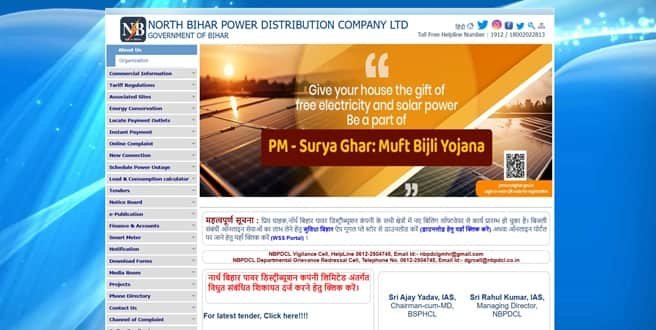
The NBPDCL website provides View & Pay Bill, Print Receipt, complaint registration, new connection, smart-meter and outage-related services. A notice on the site also directs consumers to the newer WSS portal and Suvidha Bihar app for electricity-related online services.
NBPDCL Login
NBPDCL provides consumer login using the CA Number and password. The main website also provides new consumer registration and forgotten-password options, while newer online consumer services are being routed through the WSS/Suvidha system.
To access NBPDCL consumer services, follow these general steps:
- Visit the official NBPDCL website.
- Open Consumer Login or the current WSS consumer-service link.
- Enter the CA Number.
- Enter the registered password or complete the login verification requested.
- Use Forgot Password if the registered credentials cannot be recalled.
- Complete New Consumer Registration if an account has not been created.
- Open the required bill, payment, receipt or service option after login.
Consumers should note that NBPDCL has changed its billing software and directs users to the newer WSS/Suvidha system for many online services. If an older login page does not provide the required service, use the current portal link shown on the official NBPDCL homepage.
NBPDCL Electricity Bill Payment
NBPDCL provides a Quick Bill Payment facility that allows consumers to view and pay an electricity bill without registering or logging in. The main information required is the CA Number printed on the electricity bill.
The quick-payment screen can fetch the current bill details after the CA Number is entered. Consumers should verify the billing month, due date and payable amount before selecting the payment option.
How to Pay NBPDCL Electricity Bill Online
The general process is:
- Visit the official NBPDCL website.
- Select View & Pay Bill or Quick Bill Payment.
- Enter the CA Number printed on the electricity bill.
- Submit the number to fetch the current billing information.
- Review the due date and payable amount.
- Select the Pay Bill option.
- Complete the payment through the available authorised method.
- Save or print the successful payment receipt.
NBPDCL also provides a Search/Know Your CA Number facility. Consumers who do not know the CA Number may be able to search it using older account or consumer details, after which the CA Number can be kept for future bill payments and registration.
Always confirm that the NBPDCL CA Number and consumer details are correct before paying. Use the official NBPDCL/WSS/Suvidha channels and never disclose OTPs, UPI PINs, card PINs or passwords to someone claiming to prevent disconnection.
How to View NBPDCL Electricity Bill
The NBPDCL Quick Bill Payment system is designed not only for payment but also for bill viewing. After entering the CA Number, the portal can display the latest billing information and provide a View Bill option.
Steps to View NBPDCL Electricity Bill
- Go to the official NBPDCL website.
- Open View & Pay Bill.
- Enter the CA Number.
- Submit the details to fetch the latest bill.
- Review the bill month and due date.
- Check the net payable amount and other displayed payment information.
- Select View Bill.
- Open, save or print the bill in the format provided by the portal.
The CA Number is the main consumer identifier used by NBPDCL online billing services. If the CA Number is not available, the official search facility can help locate it using older account details or Consumer ID information.
NBPDCL also provides receipt-printing options. Consumers who have made an online payment should use the official receipt facility where available and keep the payment confirmation until the bill account reflects the transaction.
How to Download NBPDCL Bill
When View Bill is selected, the NBPDCL billing system can provide the electricity bill in a printable or savable format. Save the bill locally if it is needed for consumption comparison, address records or a billing complaint.
For paid bills, use the Print Receipt facility rather than treating the bill itself as proof of payment. The receipt or transaction reference is the more useful record if an online payment later needs to be traced.
NBPDCL Customer Care Number
NBPDCL lists 1912 as its toll-free customer-care number for bill and power-related complaints. The official website also displays 18002022813 as a toll-free helpline number.
| Customer Service | Number |
| NBPDCL Customer Care | 1912 |
| Alternate Toll-Free | 18002022813 |
| Bill & Power Complaints | 1912 |
Consumers can register wrong-bill and other electricity complaints through the NBPDCL online grievance facility. A unique complaint identification number is provided after registration, and this number should be kept for checking the progress of complaint redressal.
The NBPDCL corporate office is listed at:
North Bihar Power Distribution Company Ltd., Third Floor, Vidyut Bhawan, Bailey Road, Patna – 800001, Bihar. For ordinary billing and supply complaints, consumers should first use 1912 or the online complaint system instead of visiting the company headquarters.
Other NBPDCL Online Services
Other NBPDCL services include new electricity connections, smart-meter consumer activities, power-outage information, payment-outlet location, receipt printing, load and consumption calculators, complaint registration and services available through the Suvidha Bihar app.
Frequently Asked Questions
Q. How can I find my NBPDCL CA Number if I only have an old account number?
Use the official Search/Know Your CA Number facility. The older NBPDCL payment guidance allows consumers to search using old Account Number or Consumer ID details. Once found, save the CA Number because it is used for bill payment and other consumer services.
Q. What should I do if my NBPDCL online payment is debited but no receipt is generated?
Keep the bank or UPI transaction reference and avoid making an immediate second payment. Check the bill/payment status and receipt facility again. If the transaction does not appear, contact 1912 and provide the CA Number, payment date, amount and transaction reference.
Q. Should a smart-meter consumer use the normal NBPDCL bill page for every payment?
Smart-meter consumers should follow the smart-meter payment or recharge option linked from the official NBPDCL website when that is the service assigned to their meter. The normal postpaid bill-payment process and smart-meter recharge process are not always the same.
Q. How do I complain about a wrong NBPDCL electricity bill?
Register the complaint through the official online grievance facility or call 1912. Keep the CA Number, disputed bill, meter reading and any supporting photo or earlier bill ready. Save the unique complaint identification number issued after registration.
Q. What is the Suvidha Bihar app used for?
NBPDCL directs consumers to the Suvidha Bihar app for electricity-related online services under the newer billing setup. It can be useful when a service has moved away from an older web page or when the consumer wants to manage services from a mobile device.



