MSPDCL stands for Manipur State Power Distribution Company Limited. Its consumer billing system changed significantly in 2026: the older billing.mspdcl.info portal now directs consumers to the newer billing.mspdcl.in platform for checking and paying electricity bills. Using the new portal is important because the login, registration and quick-pay process has been redesigned around mobile OTP and Consumer ID.
The new ConsumerUGO portal separates registered account access from Quick Pay. Registered consumers login with a mobile number and OTP, while the Quick Pay page lets postpaid users search an outstanding bill using the Consumer ID and provides separate handling for prepaid meter recharge/outstanding payments.
This guide explains the current MSPDCL login, postpaid bill payment, prepaid options, bill history, customer-care numbers and what existing users of the old portal should do now.
MSPDCL Quick Details
| Details | Information |
| Full Name | Manipur State Power Distribution Company Limited |
| Common Name | MSPDCL |
| Service Area | Manipur |
| Main Services | Electricity distribution, postpaid billing and prepaid services |
| Online Bill Payment | Available |
| Bill Viewing | Available |
| Primary Consumer Identifier | Consumer ID; registered mobile number for login |
| Customer Care | 1912 |
| Office | 3rd Floor, Secured Office Complex, North AOC near 2nd MR Gate, Imphal, Manipur – 795001 |
| Official Website | mspdcl.info / billing.mspdcl.in |
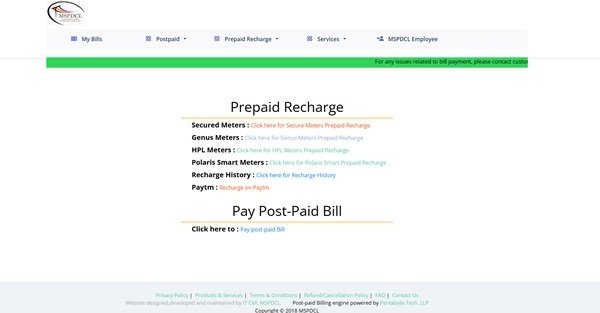
MSPDCL moved to a new billing platform from 6 July 2026. Consumers with an old billing.mspdcl.info bookmark should use billing.mspdcl.in for current bill checking and payment.
MSPDCL Login
The new MSPDCL ConsumerUGO portal uses mobile-number login. A consumer enters the registered mobile number, requests an OTP and authenticates the account. First-time users can register from the same portal.
To access MSPDCL online consumer services, follow these general steps:
- Open the current MSPDCL billing portal at billing.mspdcl.in.
- Enter the registered mobile number under Consumer Login.
- Select Get OTP.
- Enter the OTP sent to the mobile number.
- Complete the login and open the consumer dashboard.
- If you are a first-time user, select Register and provide the requested name, mobile number and e-mail ID.
- Map/verify the correct electricity connection before using account services.
If the portal does not recognise the mobile number, use first-time registration or contact MSPDCL. Do not continue using the retired .info billing portal merely because an old browser bookmark still opens it.
MSPDCL Electricity Bill Payment
MSPDCL’s new Quick Pay page separates prepaid and postpaid functions. For a postpaid bill, the consumer enters the Consumer ID to search the outstanding amount. Prepaid users select the meter type or use the prepaid option appropriate to the account.
Before paying, check the Consumer ID, connection information and outstanding amount returned by the portal.
How to Pay MSPDCL Electricity Bill Online
The general process is:
- Open billing.mspdcl.in and choose Quick Pay.
- For a postpaid account, enter the Consumer ID under PostPaid Bill Outstanding Payment.
- For prepaid service, choose the relevant meter/recharge option shown by the portal.
- Fetch the bill/outstanding details.
- Verify the consumer and amount carefully.
- Choose an available payment method and complete the transaction.
- Save the acknowledgement and check payment/bill history after successful payment.
Registered consumers can use the portal to view payment history and consumption history in addition to paying bills. This is useful when a payment has already been made but the current outstanding amount appears wrong.
MSPDCL also maintains an online payment complaint route for cases where money is debited but the expected voucher/confirmation is not generated. Keep the Consumer ID, payment date and bank reference ready.
How to View MSPDCL Electricity Bill
The new consumer portal can retrieve utility bills and account history after login, while Quick Pay can fetch the current outstanding postpaid amount using the Consumer ID. Registered users receive broader access to billing and consumption information.
Steps to View MSPDCL Bill
- Open the new MSPDCL billing portal.
- Login with the registered mobile number and OTP for full account access.
- Select the mapped electricity connection.
- Open Utility Bill/current bill information.
- Use Payment History or Consumption History for earlier records and context.
- For a quick outstanding check, use Quick Pay and enter the Consumer ID.
- Save or download the bill/receipt where the portal provides that option.
Postpaid and prepaid consumers should use the service that matches their meter/account type. A prepaid recharge balance or outstanding clearance is not the same as a normal monthly postpaid energy bill.
How to Download MSPDCL Bill
The portal provides utility-bill and account-history functions for registered consumers. Open the required billing record and use the available download, print or save option.
For a disputed payment, save the bill/transaction record before raising a complaint so MSPDCL can match the Consumer ID, payment date and amount.
MSPDCL Customer Care Number
MSPDCL lists 1912 as a 24×7 toll-free consumer redressal number for postpaid billing and prepaid recharge issues. The new portal also lists 7640081232 and 7640081238 for WhatsApp/call support.
Use the billing support numbers for bill or recharge issues. For unrelated general information, MSPDCL directs consumers to its main website and operating offices.
| Customer Service | Contact |
| MSPDCL Customer Care | 1912 (24×7 Toll Free) |
| WhatsApp / Call Support | 7640081232 / 7640081238 |
| Current Billing Portal | billing.mspdcl.in |
| Official Website | mspdcl.info |
MSPDCL Office Address
MSPDCL Corporate Office: 3rd Floor, Secured Office Complex, North AOC near 2nd MR Gate, Imphal, Manipur – 795001. Consumers can also approach the relevant sub-division/division office for connection-specific issues.
Other MSPDCL Online Services
The new ConsumerUGO portal supports bill retrieval, online payment, e-bill options, payment history, consumption history, complaints, profile management and new-connection applications. Prepaid and postpaid services are presented separately where necessary.
The migration from the old portal is itself important consumer information. If instructions found on another website still point only to billing.mspdcl.info, treat them as outdated and start from the new MSPDCL billing portal instead.
Frequently Asked Questions
Q. Is billing.mspdcl.info still the main MSPDCL bill-payment portal?
No. The old portal displays a notice directing consumers to billing.mspdcl.in, with migration to the new platform starting on 6 July 2026. Use the new portal for current bill checking and payment.
Q. How does a first-time user register on the new MSPDCL portal?
Open billing.mspdcl.in and choose Register. The registration page asks for basic details such as full name, mobile number and e-mail ID, after which the consumer can access account-linked services.
Q. What is the difference between MSPDCL postpaid Quick Pay and prepaid recharge?
Postpaid Quick Pay searches an outstanding bill using the Consumer ID. Prepaid users choose the meter/recharge option appropriate to their meter type. Use the route matching the connection because the transactions serve different purposes.
Q. What should I do if money is debited but MSPDCL does not generate confirmation?
Keep the bank/UPI reference and Consumer ID, then use MSPDCL’s payment-complaint/customer-care route. Avoid repeating the payment until the status of the first transaction is checked.
Q. Can the new MSPDCL portal show consumption and payment history?
Yes. The ConsumerUGO portal lists both Payment History and Consumption History among the services available to registered consumers.



