MPPaKVVCL refers to Madhya Pradesh Paschim Kshetra Vidyut Vitaran Company Limited, the West Discom headquartered in Indore. The company is more commonly branded as MPPKVVCL or MPWZ, and its current consumer-facing digital system is closely associated with the Urjas platform and Urjas 2.0 mobile application.
For bill retrieval, consumers may be asked for the IVRS Number or Account ID. The current MPOnline electricity service also identifies the Indore Discom and accepts an IVRS/Account ID before fetching the bill. Urjas adds practical functions such as bill download, payment, bill correction, smart-meter consumption and consumer requests.
This guide explains how to identify the correct MP Paschim service, login or register where required, view and pay the electricity bill and use official support channels without confusing West Discom with the Jabalpur or Bhopal utilities.
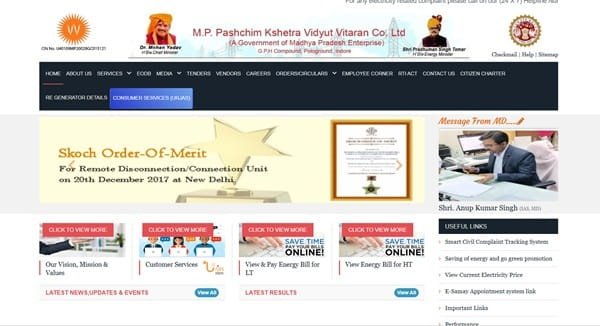
MPPaKVVCL Quick Details
| Details | Information |
| Full Name | Madhya Pradesh Paschim Kshetra Vidyut Vitaran Company Limited |
| Common Name | MPPKVVCL / MPWZ / West Discom |
| Service Area | Western Madhya Pradesh distribution area, including Indore region |
| Main Services | Electricity distribution and consumer services |
| Online Bill Payment | Available |
| Bill Viewing | Available |
| Primary Consumer Identifier | IVRS Number / Account ID |
| Customer Care | 1912 |
| Office | GPH Compound, Polo Ground, Indore, Madhya Pradesh – 452003 |
| Official Website | mpwz.co.in |
The title uses MPPaKVVCL to distinguish “Paschim,” but the utility itself commonly uses MPPKVVCL. Look for Indore/West Discom branding and the Urjas service before entering account information.
MPPaKVVCL Login
MP Paschim consumers can use official web services and the Urjas platform. Urjas 2.0 is designed for consumer electricity services and can provide account-linked bill, complaint and smart-meter functions. Login or registration requirements can vary by the specific web or app service selected.
To access MPPaKVVCL online consumer services, follow these general steps:
- Open the official MP Paschim website or Urjas consumer service.
- Choose the consumer login/registration option when the selected service requires an account.
- Enter the registered mobile number or account credentials requested by the current interface.
- Map the correct IVRS Number/Account ID to the profile where required.
- Complete OTP or other security verification.
- Open bill, payment, complaint or smart-meter services from the consumer menu.
- Use account recovery or support if the connection cannot be mapped.
For a simple bill lookup, an authenticated profile may not be necessary. The MPOnline Indore Discom bill service can fetch a bill using the IVRS Number/Account ID and CAPTCHA, which is useful for a one-time payment.
MPPaKVVCL Electricity Bill Payment
MP Paschim electricity bills can be paid through authorised digital channels including the utility’s Urjas system and the MPOnline bill service. The bill-fetch screen asks for the IVRS Number/Account ID before showing the payable amount.
Because “MPPKVVCL” is also used in the name of MP Poorv, confirm that the selected operator is the Indore/West Discom before paying.
How to Pay MPPaKVVCL Electricity Bill Online
The general process is:
- Open the official MP Paschim/Urjas service or authorised MPOnline electricity page.
- Select Madhya Pradesh Paschim Kshetra Vidyut Vitaran / Indore Discom.
- Enter the IVRS Number or Account ID.
- Complete the CAPTCHA or verification step.
- Fetch and verify the consumer name and bill amount.
- Choose an authorised payment method and complete the transaction.
- Save the receipt and check bill/payment history after payment.
Urjas 2.0 supports electricity-bill payment and also provides billing services such as bill download and passbook/bill history. This makes it useful when a consumer needs both the current payment and an account record.
If a payment is debited but no receipt appears, keep the transaction reference and check the Urjas/online payment history before retrying. Duplicate payment is harder to resolve than a delayed status update.
How to View MPPaKVVCL Electricity Bill
MP Paschim bill viewing can be done through the Indore Discom online service by entering the IVRS Number/Account ID. Registered Urjas users can also access bill-related information and smart-meter data where available.
Steps to View MPPaKVVCL Bill
- Open the official MP Paschim or authorised MPOnline bill service.
- Choose the Indore/West Discom.
- Enter the IVRS Number/Account ID.
- Complete CAPTCHA or required verification.
- Fetch the current bill and verify consumer details.
- Use Urjas bill/passbook history for earlier records where available.
- Download the bill or save the screen/receipt for records.
For smart-meter consumers, consumption information can provide useful context when a bill changes sharply. Compare the billing period and recorded units before raising a bill correction request.
How to Download MPPaKVVCL Bill
Urjas 2.0 explicitly provides bill download and passbook/bill-history functions. Open the correct connection, select the required bill period and use the download/share option offered by the app or portal.
Keep a downloaded copy when filing a bill-correction or meter-related request so the disputed reading and charges are documented.
MPPaKVVCL Customer Care Number
The national electricity helpline 1912 is the primary complaint route for MP Paschim consumers. The company also maintains local/central support channels through its Urjas ecosystem and operating offices.
When contacting support, provide the IVRS Number/Account ID and registered mobile number. For payment issues, also provide the date, amount and transaction reference; for meter issues, record the displayed meter reading and, where safe, keep a photograph.
| Customer Service | Contact |
| MP Paschim Customer Care | 1912 |
| Consumer App | Urjas 2.0 |
| Official Website | mpwz.co.in |
MPPaKVVCL Office Address
MP Paschim Corporate Office: GPH Compound, Polo Ground, Indore, Madhya Pradesh – 452003. Most routine billing and consumer requests can be initiated through official digital services without visiting the corporate office.
Other MPPaKVVCL Online Services
Urjas 2.0 supports bill payment, bill download, bill correction, smart-meter consumption, prepaid-consumer facilities, new LT service connection, load enhancement, name transfer, permanent disconnection, meter replacement, cable replacement and complaint registration.
These service options are useful because they let consumers choose the correct workflow instead of using a generic complaint for every issue. For example, a billing error should go through bill correction, while a transformer or cable problem should use the relevant technical request.
Frequently Asked Questions
Q. What should I enter if the MP Paschim bill page asks for IVRS / Account ID?
Use the number printed on the current electricity bill that matches the requested field. The Indore Discom bill service accepts IVRS/Account ID, so do not substitute a meter number or an unrelated service reference.
Q. Can Urjas 2.0 show smart-meter consumption?
Yes. The current Urjas 2.0 app lists smart-meter consumption among its consumer features. This can help a smart-meter consumer compare recent usage before questioning a bill.
Q. Can I request a bill correction through Urjas?
Yes. Urjas 2.0 includes bill-correction services. Keep the bill period, current meter reading and any supporting details ready so the request is specific.
Q. What should I do if the MP Paschim portal says my consumer is not found?
First confirm that you selected the Indore/West Discom and entered the correct IVRS/Account ID. If it still fails, use 1912 or the utility’s support route instead of trying random variations of the number.
Q. Can prepaid consumers use MP Paschim digital services?
Urjas 2.0 lists prepaid-consumer facilities among its features. The exact menu depends on the meter and account configuration, so use the prepaid option displayed for the mapped connection.



