MESCOM stands for Mangalore Electricity Supply Company Limited. It distributes electricity across its assigned service area in coastal and parts of Malnad Karnataka. For consumers, MESCOM has developed a fairly broad set of digital services so routine work such as checking bills, making payments, viewing consumption history and registering service requests can be handled without repeated visits to an electricity office.
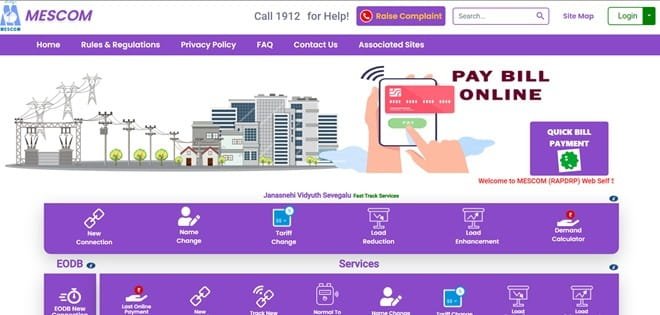
The MESCOM Consumer Portal provides account registration, User ID and password login, quick bill payment without registration, account summary, View/Pay Bill, billing and payment history, consumption history and online service requests. MESCOM also operates its official Nanna MESCOM mobile application for bill payment, account registration, complaints, outage information and billing or usage history.
This article explains MESCOM login, online electricity bill payment, how to view or download a bill, customer care details and other practical digital services available to electricity consumers.
MESCOM Quick Details
| Details | Information |
| Full Name | Mangalore Electricity Supply Company Limited |
| Common Name | MESCOM |
| Service Area | Coastal and parts of Malnad Karnataka under MESCOM |
| Main Services | Electricity distribution and consumer services |
| Online Bill Payment | Available |
| Bill Viewing | Available |
| Primary Consumer Identifier | 10-digit Account ID / RR Number |
| Customer Care | 1912 |
| Office | 1557, MESCOM Bhavana, Kavoor Cross Road, Bejai, Mangaluru, Karnataka – 575004 |
| Official Website | mescom.karnataka.gov.in |
The official consumer system currently uses the MESCOM Consumer Portal. Consumers should enter the identifier exactly as printed on a recent bill and verify the consumer name, service address and payable amount before completing an online transaction.
MESCOM Login
MESCOM provides a registered consumer portal with User ID and password login. New users can register with the Account ID printed on the electricity bill, while forgotten User IDs or passwords can be recovered through the available portal options.
To access MESCOM online consumer services, follow these general steps:
- Visit the official MESCOM website and open Customer Login.
- Enter the registered User ID.
- Enter the account password.
- Complete the image CAPTCHA shown on the screen.
- Select Login to open the consumer dashboard.
- New users should choose Click Here to Register and enter the Account ID printed on the bill.
- Use Forgot Password or Forgot User ID when the login credentials cannot be recalled.
MESCOM’s registration guidance identifies the Account ID as the key number for consumer-portal registration. The Account ID is a 10-digit unique number printed on the electricity bill. The RR Number is the power-supply connection number and is also printed on the bill, but the Account ID should be used for consumer-portal registration and future online communication.
MESCOM Electricity Bill Payment
MESCOM consumers can pay electricity dues online through the authorised consumer portal. A quick-payment facility is available so the current bill can generally be paid without completing full account login or portal registration.
Before payment, keep a recent electricity bill ready. Confirm the consumer identifier, name, service address and amount displayed on the screen. If any of these details do not match the intended connection, stop before authorising the transaction.
How to Pay MESCOM Electricity Bill Online
The general process is:
- Open the MESCOM official consumer portal.
- Select Quick Bill Payment or Online Payment if you do not want to register.
- Enter the Account ID requested by the payment page.
- Fetch and verify the bill amount and consumer details.
- Choose the available digital payment method.
- Complete the transaction through the authorised payment gateway.
- Save the acknowledgement or check Last Payment Status if necessary.
Registered consumers have a second route: login and choose Account Summary or View/Pay Bill, select the Account ID and proceed with payment. MESCOM states that an e-receipt/acknowledgement is generated after a successful transaction, so the consumer should keep it until the payment is reflected in the account.
After payment, do not close the payment page until the final transaction status is displayed. Save the receipt, acknowledgement or transaction reference because it can be useful if the payment takes time to appear in the electricity account.
If the bank account is debited but MESCOM does not immediately show the payment, avoid making a duplicate payment until the transaction status has been checked. Payment gateways and banks may require time to reconcile a successful transaction.
How to View MESCOM Electricity Bill
MESCOM provides online bill access through its consumer system. Registered users get the most complete access because they can open account information, the current bill and earlier billing or payment records from one dashboard.
Steps to View MESCOM Bill
- Login to the MESCOM Consumer Portal.
- Open Account Summary or View/Pay Bill.
- Select the correct 10-digit Account ID.
- Open the current electricity bill.
- Check the amount due, due date and consumer details.
- Use Billing and Payment History for earlier billing periods.
- Use Consumption History when comparing monthly electricity use.
When checking a bill, look beyond the total amount. Review the billing period, previous and current meter reading, units consumed, tariff/category, fixed or demand charges, arrears or adjustments and the payment due date. This makes it easier to identify a billing discrepancy before payment.
How to Download MESCOM Bill
Where the MESCOM consumer portal provides a detailed bill PDF, printable bill view or e-bill, open the required billing period and use the download or print option. Registered consumers generally have better access to previous billing records than users making only a quick payment.
Saving the bill and payment receipt is useful for reimbursement, address verification, tenant-landlord reconciliation, accounting records and future billing disputes. Keep the original digital receipt until the payment is clearly reflected in the consumer account.
MESCOM Customer Care Number
The principal electricity helpline for MESCOM consumers is 1912. It can be used for power-supply complaints and other electricity-related issues. Consumers should use official channels rather than calling numbers received in unverified disconnection messages or payment alerts.
| Customer Service | Contact |
| MESCOM Customer Care | 1912 |
| Official Website | mescom.karnataka.gov.in |
When registering a complaint, keep the consumer identifier, registered mobile number, exact service address and a short description of the problem ready. If a complaint number or docket number is generated, save it until the issue is closed.
MESCOM Office Address
The relevant corporate office information is: 1557, MESCOM Bhavana, Kavoor Cross Road, Bejai, Mangaluru, Karnataka – 575004. Routine bill payment, bill viewing and common consumer requests can usually be handled through online services or the local subdivision office, so a visit to the corporate office is generally unnecessary.
Other MESCOM Online Services
MESCOM online services include account summary, View/Pay Bill, consumption history, consumption calculator, billing and payment history, profile update, credential change, new connection, name change, tariff change, load change and service requests or complaints. The official Nanna MESCOM app also supports online bill payment, multiple-account registration, complaint registration and tracking, outage information, billing history, usage history and payment history.
Availability can depend on consumer category, meter type, service area and whether the account has been migrated to a newer billing or smart-meter platform. Consumers should use the service options currently displayed after entering or linking their own account.
Frequently Asked Questions
Q. What is the difference between the MESCOM RR Number and Account ID?
The RR Number is the electricity connection number associated with the installation, while the Account ID is a 10-digit unique number used by MESCOM’s online consumer system. Both appear on the bill, but the Account ID is the important number for portal registration and online account management.
Q. Can a MESCOM consumer make an advance electricity-bill payment?
Yes. MESCOM’s official consumer FAQ states that an advance bill-payment option is available in the customer portal. Consumers should enter the intended amount carefully and confirm the account before submitting the payment.
Q. What if money is debited for a MESCOM payment but no receipt ID is generated?
MESCOM advises consumers not to make the same payment again immediately. Its payment guidance says to allow time for the payment gateway and bank to reconcile the transaction. Keep the bank reference and check the payment status before attempting another payment.
Q. Can MESCOM consumers use one mobile app for bills, complaints and outage information?
Yes. The official Nanna MESCOM app provides online bill payment, account registration, complaint registration and tracking, scheduled or unscheduled outage information, and billing, usage and payment history.
Q. Can rural or non-RAPDRP MESCOM consumers pay online?
MESCOM maintains a non-RAPDRP portal for rural consumers where online payment, account registration and service requests are enabled. Consumers should use the payment route linked for their specific account or subdivision.



