CHESCOM is a commonly searched name for Chamundeshwari Electricity Supply Corporation Limited, the electricity distribution utility officially branded as CESC. It serves consumers across its distribution area in southern Karnataka and provides digital facilities for bill payment, bill viewing, new-connection requests, service changes and complaint handling.
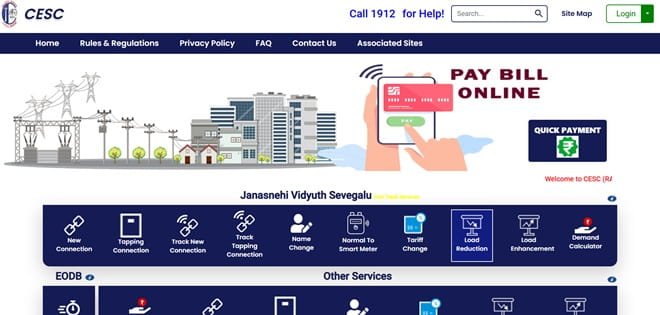
The current CESC Web Self Service (WSS) portal allows registered consumers to sign in with a registered mobile number and password. It also provides quick payment without registration, last online payment status, online applications and tracking facilities. Separate complaint and smart-meter services are also available for eligible consumers.
This article explains CHESCOM login, online electricity bill payment, how to view or download a bill, customer care details and other practical digital services available to electricity consumers.
CHESCOM Quick Details
| Details | Information |
| Full Name | Chamundeshwari Electricity Supply Corporation Limited |
| Common Name | CHESCOM / CESC |
| Service Area | CESC distribution area in southern Karnataka |
| Main Services | Electricity distribution and consumer services |
| Online Bill Payment | Available |
| Bill Viewing | Available |
| Primary Consumer Identifier | Registered mobile number / Account Number / RR Number |
| Customer Care | 1912 |
| Office | No. 29, Vijayanagara 2nd Stage, Hinkal, Mysuru, Karnataka – 570017 |
| Official Website | cescmysore.karnataka.gov.in |
The official consumer system currently uses the CESC Web Self Service (WSS) portal. Consumers should enter the identifier exactly as printed on a recent bill and verify the consumer name, service address and payable amount before completing an online transaction.
CHESCOM Login
The current CESC Web Self Service portal uses registered-mobile-number and password login. New users can register through the same portal, and a password-recovery option is available for consumers who cannot access an existing account.
To access CHESCOM online consumer services, follow these general steps:
- Open the official CESC website and enter the Web Self Service portal.
- Enter the registered mobile number.
- Enter the password linked to the WSS account.
- Complete any security verification shown on the page.
- Select Login to open the consumer account.
- If you are a new user, choose the registration option and complete mobile/account verification.
- Use Forgot Password if the registered account cannot be accessed.
Because the current WSS login is mobile-number based, consumers should ensure that the correct mobile number is linked with the electricity account. If an old or inactive mobile number is mapped to the connection, password recovery and OTP-based verification may fail until the consumer details are updated.
CHESCOM Electricity Bill Payment
CHESCOM consumers can pay electricity dues online through the authorised consumer portal. A quick-payment facility is available so the current bill can generally be paid without completing full account login or portal registration.
Before payment, keep a recent electricity bill ready. Confirm the consumer identifier, name, service address and amount displayed on the screen. If any of these details do not match the intended connection, stop before authorising the transaction.
How to Pay CHESCOM Electricity Bill Online
The general process is:
- Open the official CESC WSS portal.
- Choose Quick Payment if you do not want to sign in.
- Enter the consumer/account details requested by the payment page.
- Fetch the current bill and verify the consumer name and payable amount.
- Choose one of the payment methods offered by the authorised gateway.
- Complete the transaction and wait for the confirmation screen.
- Save the receipt or use Last Online Payment Status if confirmation is required.
Registered consumers can also access payment from within the account. Quick payment is more convenient when only the current bill has to be cleared, while registration is useful for consumers who want continuing access to bill records, applications and tracked services.
After payment, do not close the payment page until the final transaction status is displayed. Save the receipt, acknowledgement or transaction reference because it can be useful if the payment takes time to appear in the electricity account.
If the bank account is debited but CHESCOM does not immediately show the payment, avoid making a duplicate payment until the transaction status has been checked. Payment gateways and banks may require time to reconcile a successful transaction.
How to View CHESCOM Electricity Bill
CHESCOM provides online bill access through its consumer system. Registered users get the most complete access because they can open account information, the current bill and earlier billing or payment records from one dashboard.
Steps to View CHESCOM Bill
- Open the CESC Web Self Service portal.
- Login with the registered mobile number and password, or use the available bill-tracking facility.
- Open the View Bill or account-related section.
- Select or enter the relevant consumer/account details.
- Check the current bill amount, billing period and due date.
- Open the detailed bill where available.
- Download or print the bill for future reference.
When checking a bill, look beyond the total amount. Review the billing period, previous and current meter reading, units consumed, tariff/category, fixed or demand charges, arrears or adjustments and the payment due date. This makes it easier to identify a billing discrepancy before payment.
How to Download CHESCOM Bill
Where the CHESCOM consumer portal provides a detailed bill PDF, printable bill view or e-bill, open the required billing period and use the download or print option. Registered consumers generally have better access to previous billing records than users making only a quick payment.
Saving the bill and payment receipt is useful for reimbursement, address verification, tenant-landlord reconciliation, accounting records and future billing disputes. Keep the original digital receipt until the payment is clearly reflected in the consumer account.
CHESCOM Customer Care Number
The principal electricity helpline for CHESCOM consumers is 1912. It can be used for power-supply complaints and other electricity-related issues. Consumers should use official channels rather than calling numbers received in unverified disconnection messages or payment alerts.
| Customer Service | Contact |
| CHESCOM Customer Care | 1912 |
| Official Website | cescmysore.karnataka.gov.in |
When registering a complaint, keep the consumer identifier, registered mobile number, exact service address and a short description of the problem ready. If a complaint number or docket number is generated, save it until the issue is closed.
CHESCOM Office Address
The relevant corporate office information is: No. 29, Vijayanagara 2nd Stage, Hinkal, Mysuru, Karnataka – 570017. Routine bill payment, bill viewing and common consumer requests can usually be handled through online services or the local subdivision office, so a visit to the corporate office is generally unnecessary.
Other CHESCOM Online Services
CESC digital services include quick bill payment, last-payment-status checking, new connection applications, name change, tariff change, load change, request certificates and deposit-refund requests. The WSS portal also provides tracking for new connections and service-change applications. CESC’s smart-meter application offers eligible consumers account information, consumption information, recharge/payment history, complaint registration and complaint-status features.
Availability can depend on consumer category, meter type, service area and whether the account has been migrated to a newer billing or smart-meter platform. Consumers should use the service options currently displayed after entering or linking their own account.
Frequently Asked Questions
Q. Why do some websites use CHESCOM while the official portal uses CESC?
CHESCOM is a commonly used search term for Chamundeshwari Electricity Supply Corporation Limited, but the company itself uses CESC as its official abbreviation and branding. Consumers should therefore not be confused when the official website or WSS portal displays CESC rather than CHESCOM.
Q. Where can I find the RR Number or account details for my CESC connection?
The RR Number and other consumer identifiers are normally printed on the electricity bill and may also be available on connection or meter-related records. Use the identifier exactly as shown on a recent bill when the payment, complaint or service portal asks for it.
Q. What should I do if a CESC online payment is debited but no receipt appears?
Do not immediately pay the same bill again. First check Last Online Payment Status and the bank or UPI transaction record. Keep the transaction reference. If the payment does not get posted after normal reconciliation time, contact CESC through 1912 or the official complaint channel with the payment details.
Q. Can CESC smart-meter consumers check consumption and payment history digitally?
Yes. The official CESC Smart Meter application provides consumption information and recharge/payment history for supported smart-meter accounts. Availability depends on whether the connection has been migrated to the supported smart-meter system.
Q. What should I check before raising a complaint about an unusually high bill?
Compare the current meter reading with the reading printed on the bill, review recent consumption where available and check whether arrears, adjustments or additional charges are included. A clear meter photograph and the latest bill can make it easier to explain the issue when registering a billing complaint.



